Enterprise deployments
Builder Code offers two deployment options for enterprise teams: Standard Cloud and Dedicated Builder Code Runtime. Both include background agents, shareable preview links, PR bots, and real-time co-editing, and nothing needs to be installed locally.
The difference is how Builder Code connects to your internal systems and whether your workloads run on shared or dedicated infrastructure.
Standard Cloud
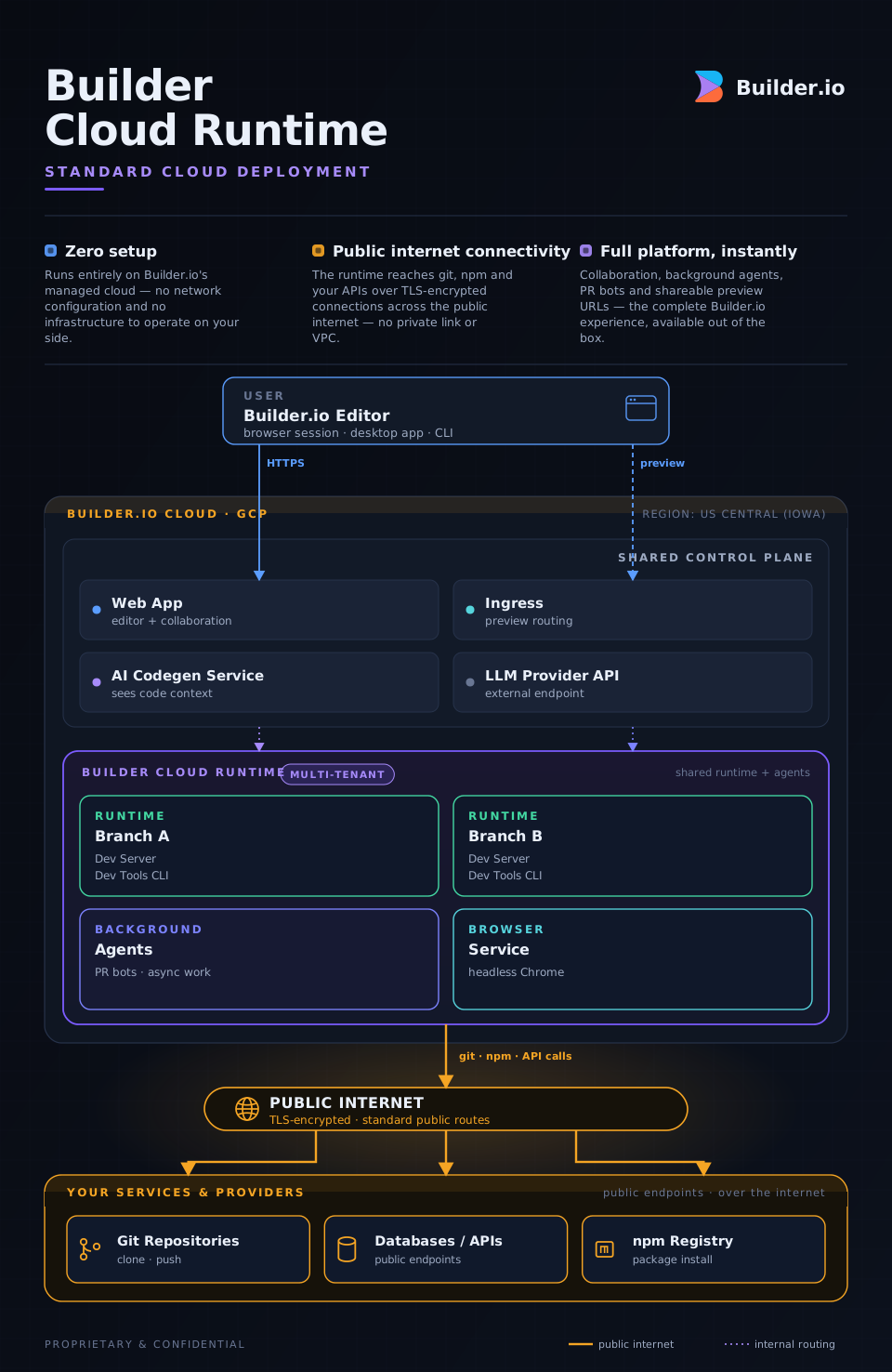
All infrastructure is managed by Builder on shared, multi-tenant Google Kubernetes Engine (GKE), so other customers' workloads run on the same cluster. Zero setup required.
The runtime containers that clone your repo, run builds, and serve previews run on a shared cluster. The editor, AI service, and storage live in Builder's GCP project. To reach your internal systems, your team adds our static outbound IP to the allowlists on your git servers, package registries, or internal APIs.
Standard Cloud on the Enterprise plan adds the security, identity, and source-control controls larger organizations need, without any dedicated infrastructure. These include SSO, custom roles, multi-team approvals, self-hosted git providers, custom Docker images, private plugins, and more.
What's included
- SSO (SAML / OIDC): integrate with your identity provider
- Custom roles & multi-team approvals: fine-grained access control
- Self-hosted git providers: GitHub Enterprise, GitLab self-hosted, Bitbucket Data Center, via static-IP outbound allowlisting
- Custom Docker images: bring your own runtime environment
- Private plugins, multi-repo projects, design system intelligence, space-level custom instructions
Network connectivity
Standard Cloud connects to your internal infrastructure using a known static outbound IP. Your networking team adds this IP to allowlists on any private resource Builder Code needs to reach, such as git servers, npm registries, and internal APIs. Traffic goes outbound from Builder's infrastructure over the public internet to your endpoint; your firewall controls what's allowed in.
This covers the majority of enterprise git and package registry setups. It does not provide a private tunnel. If your policy prohibits any public-internet traversal for source-code access, see Dedicated Builder Code Runtime below.
Best for
- Enterprises that need SSO, audit logging, and access controls on shared infrastructure
- Teams whose internal services are reachable via IP allowlisting
- Organizations that want the fastest time-to-value with no infrastructure setup
Dedicated Builder Code Runtime
A dedicated, single-tenant runtime cluster managed by Builder, connected to your VPC via Private Service Connect.
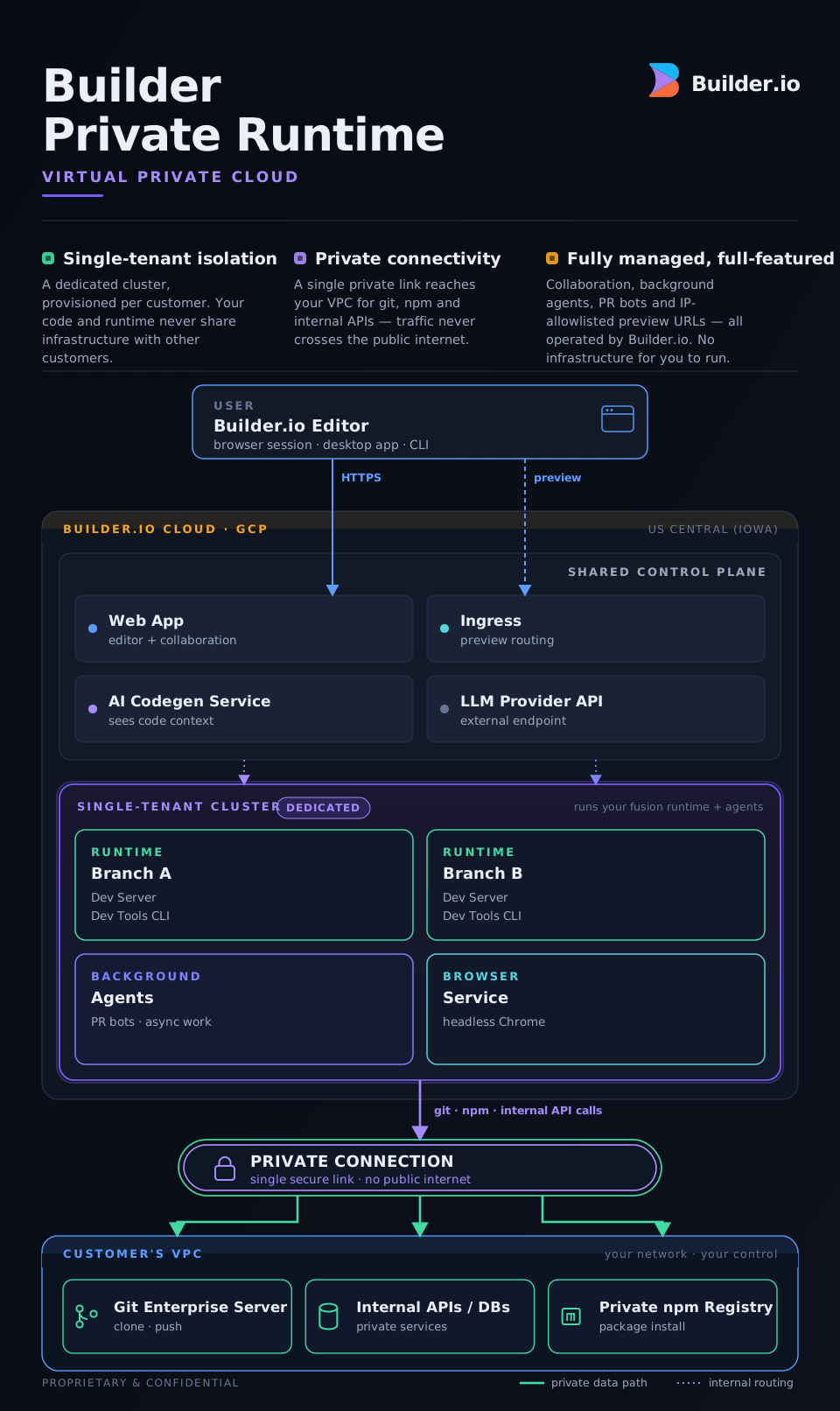
Builder provisions a GKE cluster used only by your organization, inside Builder's existing GCP infrastructure. Your runtime containers and background agents run on it. A single Google Private Service Connect (PSC) link connects the cluster to your VPC (your private cloud network). Runtime containers can then reach your internal git servers, package registries, databases, and APIs without sending traffic over the public internet.
The Builder control plane (editor, AI service) remains shared and communicates with your tenant cluster via internal GCP networking. You get all the collaboration features of Standard Cloud plus single-tenant isolation and VPN-grade private connectivity.
What's included
- Everything in Standard Cloud, plus:
- Single-tenant runtime isolation: your workloads never share a node with another customer
- Private Service Connect: one PSC link from your dedicated cluster to your VPC; no public internet traversal for git, npm, or internal API access
- Customer-controlled IP allowlist on preview URLs: previews are publicly resolvable but restricted to your approved IP ranges (CIDRs) using Google Cloud Armor
- AWS PrivateLink: planned; Google Cloud (PSC) is the proven path today
- Background agents run inside your tenant cluster, so async work (PR bots, scheduled tasks) also benefits from private network access
Network connectivity
Dedicated Builder Code Runtime uses Google Private Service Connect to establish a private tunnel between Builder's tenant cluster and your VPC. No traffic from the runtime to your internal services traverses the public internet. The path is entirely within Google's network backbone.
Setup requires your networking team to authorize the PSC connection on your side. For customers on Google Cloud, the technical work is a few hours; Builder handles the cluster configuration. The timeline most customers see (1–2 weeks) is driven by internal scheduling and security review, not technical complexity.
AWS customers can be onboarded today via a hybrid approach, with full AWS PrivateLink support on the roadmap.
Best for
- Enterprises whose security policy prohibits public-internet traversal for source code access
- Teams requiring VPN-level private connectivity to internal git servers, registries, or APIs
- Organizations that need single-tenant runtime isolation without managing their own infrastructure
- Customers on Google Cloud who want the fastest dedicated setup
Choosing between them
Choose Dedicated Builder Code Runtime if any of the first three rows apply to you. Otherwise, Standard Cloud is enough.
| If this applies to you | Choose |
Your policy requires that no source-code traffic traverse the public internet | Dedicated Builder Code Runtime |
Your internal services require a VPN tunnel or private peering to access | Dedicated Builder Code Runtime |
You need runtime workloads isolated to a single-tenant cluster | Dedicated Builder Code Runtime |
None of the above apply, and your internal services can be reached by adding a static IP to an allowlist | Standard Cloud |
Feature comparison
Privacy & network
| Capability | Standard Cloud | Dedicated Builder Code Runtime |
Private network connectivity | Static-IP allowlisting | PSC / PrivateLink |
Runtime isolation | Shared | Single-tenant |
Identity & access
| Capability | Standard Cloud | Dedicated Builder Code Runtime |
SSO (SAML / OIDC) | ✔ | ✔ |
Custom roles | ✔ | ✔ |
Multi-team approvals | ✔ | ✔ |
Source control & infrastructure
| Capability | Standard Cloud | Dedicated Builder Code Runtime |
Self-hosted git providers (GHE, GitLab) | ✔ via static-IP | ✔ via PSC |
Custom Docker images | ✔ | ✔ |
Workspace & customization
| Capability | Standard Cloud | Dedicated Builder Code Runtime |
Multi-repo projects | ✔ | ✔ |
Design system intelligence | ✔ | ✔ |
Space-level custom instructions | ✔ | ✔ |
Private plugins | ✔ | ✔ |
A note on isolation vs. zero-visibility
Dedicated Builder Code Runtime provides customer isolation. Your runtime workloads run on dedicated infrastructure, separated from all other customers. Builder remains the infrastructure operator and has operational access to the cluster, the same trust relationship you have with any managed service provider (GitHub hosts your code, AWS runs your workloads).
If you need to guarantee that Builder cannot access your source code under any circumstances, use the Desktop App in Local Mode with Privacy Mode, which is end-to-end encrypted with AES-256-GCM. Local Mode gives up collaboration features: no shareable previews and no background agents. Talk to your account team if you think you need this.
Get started
Both options require an Enterprise plan. To upgrade or get a demo:
- Contact your account team or reach out to sales
- For Dedicated Builder Code Runtime, your account team will schedule a technical kickoff to walk through the PSC setup with your networking team
