When Enterprise AI Development Gets Real: Five Friction Points, Five Fixes
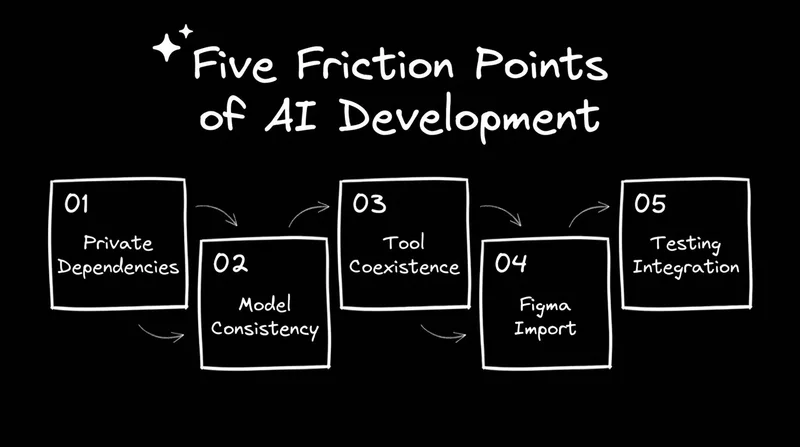
A real Builder onboarding with a global enterprise team surfaced five friction points that stall AI development adoption at scale.
Most AI development conversations happen at the level of tools. Which model is best for code generation? Whether to use Cursor or Claude Code. How many tokens does a given task consume? All real questions. None of them reveals whether a team is actually changing how they work.
The hard questions show up later, once engineers have seen the tool running and started thinking about their own codebase. They sound like this: How do we maintain consistency when different team members are choosing different models? Or: We use private npm packages behind our VPN. What happens then? Or, the one that cuts to the real issue: How does this compare to Claude Code, and can they work together?
Those questions came up in a recent Builder onboarding session with an enterprise team spanning multiple countries and disciplines. The team included frontend developers, SAP consultants, data specialists, and a technical lead managing adoption across the group. They were already using Builder and trying to figure out how to go deeper.
What they surfaced in 65 minutes maps to five friction points that show up in nearly every enterprise AI adoption effort, the specific places where momentum stalls if nobody has a clear answer ready.
Friction point 1: Private dependencies block cloud environments
One developer had tried to connect Builder to their codebase and hit a wall: private npm packages stored in a JFrog artifact repository, a cloud environment that couldn't reach them, and a VPN that blocked the connection.
Most enterprise codebases have private dependencies. Security teams don't open those registries to external tooling. Teams that don't get a clear answer assume the tool doesn't work for them and move on.
Builder's desktop app runs the same way locally as it does in the cloud, keeping the workflow intact regardless of where the code lives. Enterprise AI adoption fails at the edges — setup friction convinces teams that a tool is incompatible with their environment before they've had a chance to see what it can do. Running locally removes that friction.
Friction point 2: Model flexibility without defaults creates inconsistency
The technical lead raised a consistency question: if different team members choose different AI models for the same types of tasks, how do you maintain output consistency and learn anything useful about performance over time?
Builder supports multiple models, including several Claude versions, OpenAI models, and Gemini. For a team trying to establish shared practices and measure whether AI is actually improving delivery, flexibility without defaults creates noise.
Builder's roles and permissions layer resolves this. Teams can set constraints on which models are available, standardize instructions across projects via the Builder rules file, and enforce conventions that apply to every prompt regardless of who's running it. Teams at this stage are asking how to run a coherent rollout. Builder's governance layer is built for it.
Friction point 3: The Claude Code coexistence question
Toward the end of the session, the technical lead asked the question coming up in nearly every enterprise AI conversation right now: how does Builder compare to Claude Code, and can they coexist?
This team's backend engineers were already moving toward Claude Code, while their frontend engineers were using Builder. The question was whether the two could work together without creating more coordination overhead than they removed.
Claude Code runs as a single-player tool in a local terminal. Builder sits on top of it as a multiplayer, enterprise-grade layer:
- Every agent gets its own remote container and full dev environment
- Work is reviewable and previewable from any device
- Non-engineers can participate without setting anything up locally
The bottleneck was never purely in the coding. An individual developer getting faster at writing code doesn't move delivery timelines when the surrounding process (handoffs between design and engineering, QA cycles, and stakeholder reviews) still runs sequentially. Builder adds the collaboration layer that drives the whole workflow, with Claude Code handling the terminal-level work and Builder making that work accessible, reviewable, and parallel across the full team.
Friction point 4: The Figma-to-code gap still needs closing
One frontend developer raised an important question from a different angle. He'd been using Builder's CLI from within Figma, pasting the generated command into his terminal and working from there. Once the design context came into the build process, he couldn't see enough of what Builder was extracting and using. Which annotations were being read? Which component properties were being mapped? What the AI was inferring, and what had been explicitly defined.
This is a precision problem. Builder's Figma plugin pulls significantly more metadata than the Figma API alone, including annotations, component properties, and design tokens. That metadata drives the accuracy of the generated code. Teams that invest in properly structuring their Figma components, explicitly naming properties, and adding annotations give Builder more to work with and achieve tighter output. The teams that get the most accurate results treat their Figma files as the source of truth rather than a visual reference.
Friction point 5: Testing integration needs to be explicit
Late in the session, a developer asked whether Builder integrates with Playwright for automated testing. Any testing framework already in the codebase, or added via a prompt, can be referenced in Builder's custom instructions and applied automatically. But teams have to set this up deliberately. Before the broader team starts using the tool, someone needs to think through and codify:
- Which testing frameworks are already in the codebase
- Which conventions and checks should apply to every AI-generated change
- Which QA workflows need to be reflected in the builder rules file
Once those are in place, Builder applies them consistently across every prompt, every agent, and every branch. The setup investment is front-loaded, but it means QA conventions travel with the tool rather than depending on individual developers to remember them. Playwright works well in this setup and is worth configuring early.
What the questions tell you about where a team is
The team in this session was further along than most. They had developers using Builder's CLI, designers thinking about the Figma plugin workflow, and a technical lead asking about GitHub Projects integration. These are the questions of a team figuring out how to scale what they've started.

The team in this session was further along than most. They had developers using Builder's CLI, designers thinking about the Figma plugin workflow, and a technical lead asking about GitHub Projects integration. These are the questions of a team figuring out how to scale what they've started.
The five friction points they hit — private packages, model consistency, Claude Code coexistence, Figma import visibility, and testing integration — are the same ones showing up across enterprise teams right now. None of them are blockers, but all of them slow adoption if they go unanswered.
One developer in the session was working in Slack on a customer issue, had all the context right there in the thread, and tagged the Builder agent directly. It spun up a branch and started working on the fix. No ticket, no queue, no waiting for the next sprint. The context already existed; they just pointed to it.
That's what AI-native development looks like when it's working. A workflow where anyone with context can move work forward, and the engineer's job shifts toward reviewing what gets built.
Ready to put this into practice? Try Builder for free.