The dream of coding from your phone has been a meme for years. "I'll just SSH in from the beach" is something every dev has said exactly once before rage-closing Termux and pouting off into the ocean.
But AI agents just made this dream feel tantalizingly close to real. At 29 million daily VS Code extension installs and an ARR north of $2.5 billion, Claude Code's growth has been staggering, which means developers are building more from their terminals than ever. Naturally, they want that power everywhere, including the couch, the commute, and yes, the beach.
The internet has responded with a mini gold rush of workarounds: SSH tunnels, third-party companion apps, one-click cloud deployments, and—as of this week—Anthropic's official Remote Control feature. There's no shortage of ways to get Claude Code on your phone.
We'll walk through every major approach, explain the trade-offs, and then ask the uncomfortable question: is a terminal on a 6-inch screen really the right interface for AI agents?
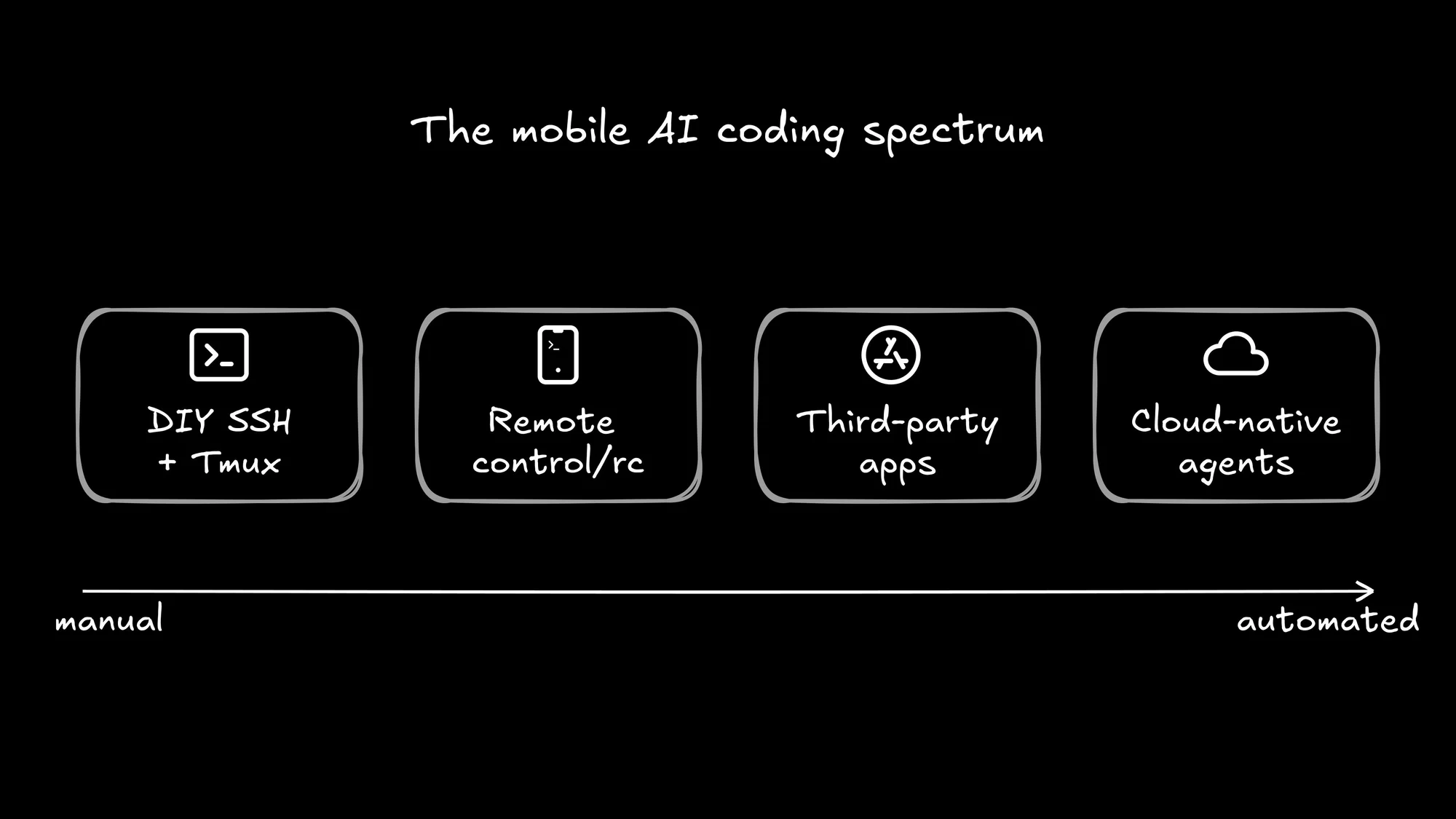
The DIY route: SSH + Tailscale + Tmux
First up, we have the OG approach for mobile coding. The architecture goes like this:
- Keep a desktop running Claude Code at home.
- Use Tailscale to create a private network between your desktop and your phone.
- Install Termux (Android) or Blink (iOS) for a real terminal.
- SSH into your desktop.
- Use tmux (or my favorite, zellij) to keep sessions alive when your phone locks.
Here's the gist:
Setup takes about 20 minutes if everything goes smoothly, and then you're running a full Claude Code session from your phone. You get full Unix power, no third-party dependencies beyond Tailscale, and it works with any CLI tool you already use.
But here's where it gets painful. SSH drops the moment your phone sleeps or hops from WiFi to cellular. Mosh can help with connection resilience, but it adds another layer to configure. And let's be honest about the user experience: you're debugging code on a screen that's barely wider than a function signature.
If managing one agent from your laptop already feels like being a sysadmin, managing it from your phone over SSH is a full-on migraine.
Claude Code Remote Control: The official answer
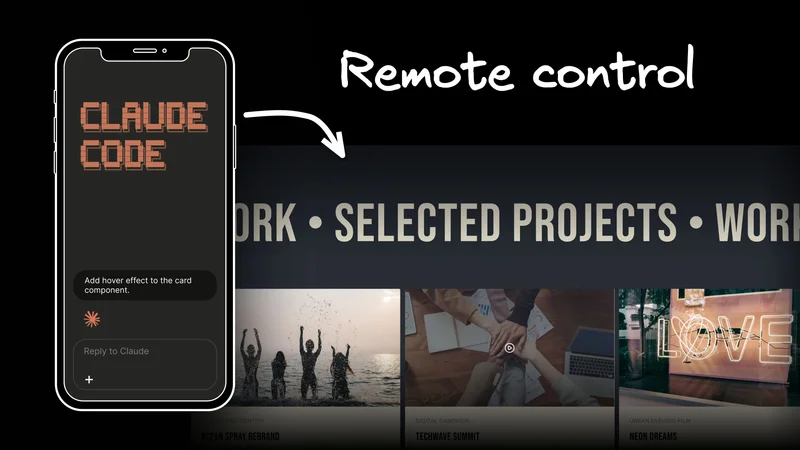
On February 25, 2026, Anthropic shipped the feature everyone had been hacking together: Remote Control. It's clean, it's official, and it takes about five seconds to set up.
From any active Claude Code session, run /rc (or claude remote-control), and you'll get a QR code. Scan it with the Claude app on your phone, and you have full control of the session—same files, same MCP servers, same project context. Walk away from your desk, and your agent keeps chugging.
The security model is solid: no inbound ports are opened on your machine, everything routes through Anthropic's API with TLS and temporary credentials, and sessions auto-reconnect after network drops (for up to about 10 minutes). It's a clean solution to a real problem.
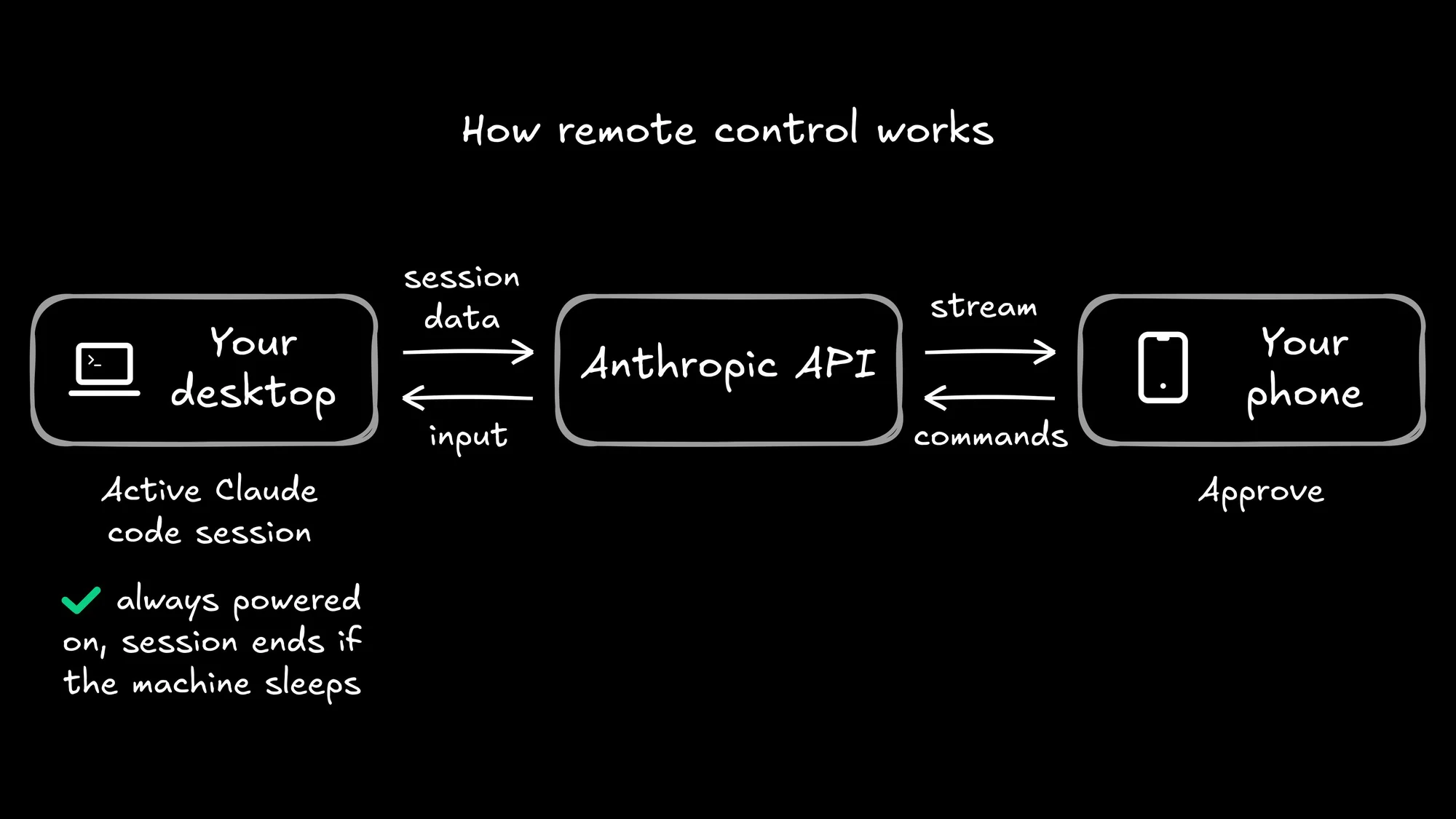
For a lot of developers, Remote Control hits the sweet spot. You kick off a refactoring task before dinner, scan the QR code, and keep tabs on it from the couch. The "shower thought → coded by coffee" pipeline is real now, at least in theory.
But a few things are worth flagging:
- Your desktop must stay powered on with the terminal open, so your laptop's battery is now an infrastructure dependency.
- You can only run one remote session at a time.
- You can't start sessions from mobile; you can only continue ones you've already kicked off.
- The feature is currently in Research Preview and Max-only ($100–200/month), with Pro access "coming soon" and no timeline for Team or Enterprise plans.
The developer response has been enthusiastic but telling. Everyone loves monitoring long-running tasks from the couch. But the most common request on X isn't "make Remote Control better"—it's "let me start sessions from my phone." As one developer put it: "I don't think you understand how many startups are going to die once Anthropic fixes the Claude Code tab in the mobile app." Remote Control is a great remote viewer. But it's not a mobile-first workflow.
Third-party apps and cloud deploys
Beyond the DIY and official routes, a whole ecosystem has bloomed:
- Mobile IDE for Claude Code (iOS): a companion app that syncs prompts and results between your iPhone and Mac via CloudKit. One free prompt per day, premium for unlimited.
- Railway's claude-code-ssh template: a one-click cloud deployment that gives you an always-on container you can SSH into from anywhere. Your laptop can finally sleep.
- The Vibe Companion: Stan Girard discovered a hidden
-sdk-urlflag in Claude Code's binary and built an open-source web UI around it. Mobile coding from your browser, no app required. - Takopi: routes Claude Code through Telegram, turning your messaging app into a coding interface.
These are all creative solutions. But they share a common assumption: that the local terminal is the right interface for this kind of work. And as the role of the developer shifts from writing code to orchestrating agents that write code, that assumption is worth questioning.
The real question: Is a terminal the right interface?
Let's zoom out for a second. We just listed five different ways to put a terminal on your phone. That's a lot of engineering effort pointed at a single UX: a command line on a small screen.
But why do developers want "Claude Code on mobile" in the first place? It's not because they love typing git push with their thumbs. Nobody wakes up dreaming of a 390-pixel-wide terminal. When you actually look at what people are asking for on X and Reddit, it comes down to four things:
- Check on long-running agent tasks without walking back to a desk
- Approve or reject changes when a notification pops up
- Kick off work from anywhere—the shower thought that should be code by the time the coffee's ready
- Keep shipping without being physically chained to a workstation
These aren't terminal problems. These are orchestration problems.
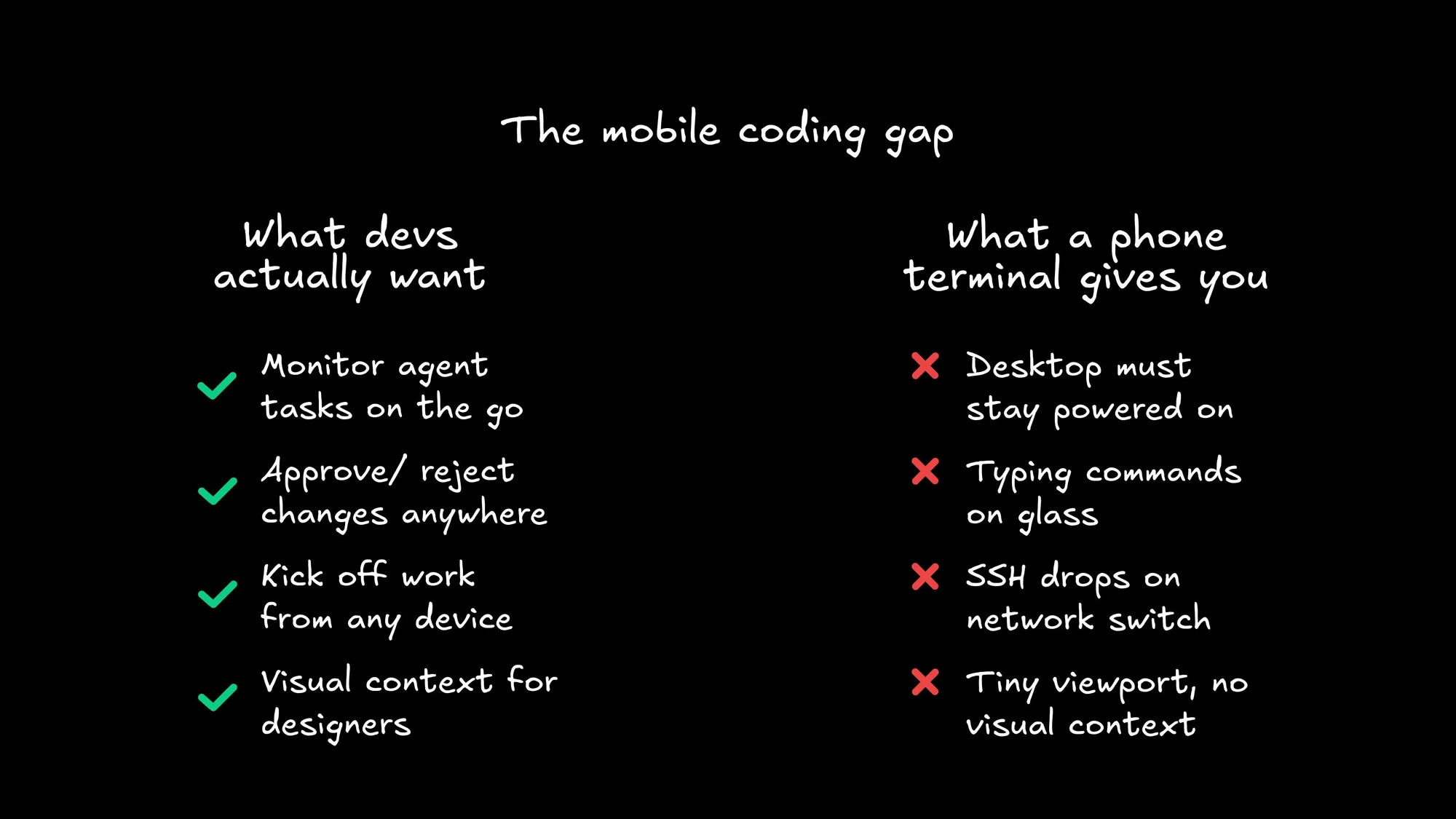
If you've already tried to run multiple agents, you know the pains: context fragmentation, resource collisions, reproducibility drifts, and the eternal question of "which agent is working on what?" Those problems are hard enough on a 27-inch monitor. Shrinking your viewport to 6 inches doesn't make them easier—it just makes them harder to see.
Think about it this way. On a laptop, a terminal-based agent is already operating with blinders on—you're watching a stream of text and hoping the diffs make sense. Now remove 85% of your screen real estate, add a virtual keyboard covering half of what's left, and try to review a 200-line component change while your phone autocorrects useState to "Use State."
This isn't a marginal downgrade. It's a fundamentally different (and worse) interaction model.
A terminal on your phone gives you raw access to an agent. What it doesn't give you is context. You can't see a visual diff, you can't review a component side-by-side with its design spec, and you can't get a birds-eye view of three agents working in parallel.
A different approach: Agents in the cloud
What if the agent wasn't tethered to your laptop at all?
That's the premise behind Builder. Instead of running agents locally and then tunneling into them from your phone, Builder defaults to cloud execution. Your agent runs in an isolated container—not your localhost—which changes the math entirely:
- No battery dependency. Your laptop can sleep, update, or catch fire. The agent keeps running.
- No port conflicts. Every run gets its own clean environment. No more zombie processes fighting for port 3000.
- Trigger from anywhere. Fire off agents from Slack, Jira, Linear, or a phone notification. The interface meets you where you are.
- Visual context. Instead of a terminal stream, you get a unified surface—design, code, agent chat, and Git diffs in one place. You can actually see what the agent built.
The key shift here is architectural. MCP standardizes the tool layer, so your agents speak the same language whether triggered from a browser, Slack, or a push notification. And because everything runs in the cloud, the experience isn't degraded by your device. Your phone becomes a command center, not a tiny laptop.
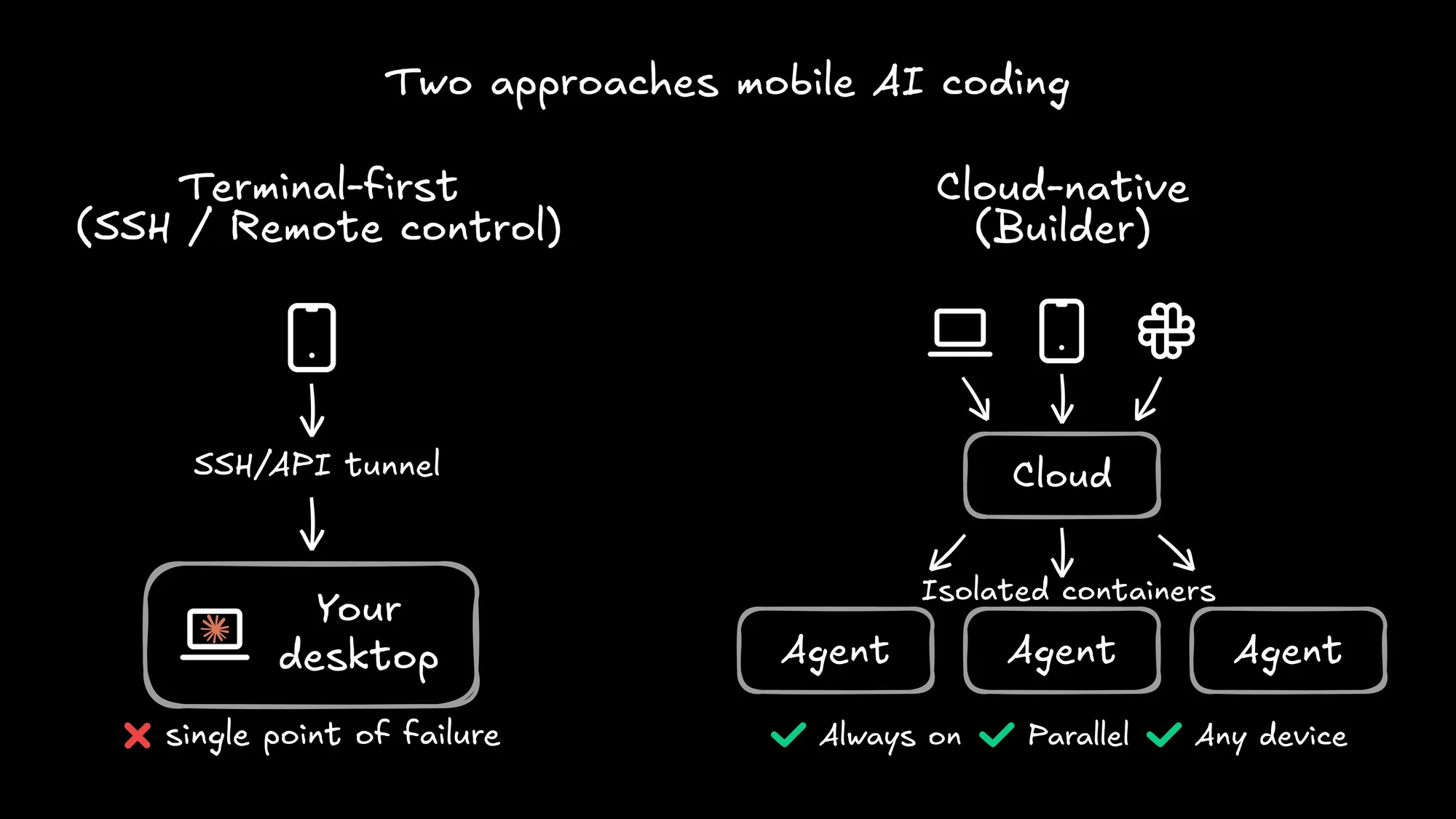
This matters for teams, too. When agents run locally, orchestration is a solo sport: one developer, one machine, one session. When they run in the cloud with a shared surface, your whole team—PMs, designers, developers—can prototype, review, and iterate using a shared visual canvas connected to your actual codebase.
A PM can approve a layout from their phone. A designer can flag a spacing issue without cloning a repo. A lead engineer can review three parallel agent runs from a single dashboard. That workflow scales. A terminal on your phone doesn't.
And for developers who care about shipping code that actually respects the codebase, cloud execution means every run starts from the same reproducible baseline. No more "it works on my machine" when the machine is your phone on 3G.
The terminal is a starting point, not the destination
Claude Code on your phone is genuinely cool. It shows that developers are hungry for mobility in their AI workflows, and the community's creativity in making it happen—from SSH hacks to Railway deploys to Anthropic's official Remote Control—is impressive.
But the answer to "how do I use AI agents on the go?" isn't to shrink your terminal. It's to rethink where the agent lives entirely.
Cloud-native agents that run independently of your local machine, accessible from any device through a visual interface with real context. That's the actual unlock. Not a smaller screen, but a bigger architecture.
The era of AI agents tied to a desk is ending. The question is whether you'll untether them with SSH, or with something built for the cloud from day one.