Everyone says they're AI-native. Almost nobody is.
What most teams have done is slot AI tools into the same broken workflow they've always had. Developers got Cursor or Copilot. PMs kept writing PRDs. Designers kept filing redlines. And everyone kept waiting in line. The handoffs didn't go away. The queues didn't shrink. Delivery timelines barely moved.
The difference matters more than most teams realize, and it's why so many organizations have adopted AI coding tools and seen almost no change in how quickly they actually ship.
Coding is roughly 16% of a developer's week, according to IDC. Even if AI makes that 25% faster by the most optimistic estimates, you've optimized approximately 0.6% of your idea-to-production cycle. The other 99.4% (the planning, the review cycles, the 'did you see my Figma comment?') is exactly where it was before.
Everything around coding is still siloed, still structured around the assumption that code is expensive. It isn't anymore. The teams that have internalized this are operating in fundamentally different ways.
What the old workflow actually costs you
Walk through a typical feature cycle. PM writes a spec. Designer builds mockups in Figma. PM and design align (at least two meetings). Design hands off redlines. Engineering translates redlines into code, makes judgment calls on the details nobody specified, and sends it back for review. Design says it's close, but the spacing is off. Engineering fixes it. QA runs it and files three bugs. Engineering fixes those. Product reviews and wants a copy change. By the time this feature ships, four people touched it across six weeks, and half the decisions were made by the wrong person at the wrong time.
The workflow was designed for a world where code was the bottleneck. In that world, front-loading every decision with documentation, alignment, and approval made sense. You didn't want to touch the code until you were sure.
That world is over.
What AI-native actually means
In an AI-native workflow, code comes first. You build something, put it in front of people, and let the feedback drive what happens next. The prototype is a working feature in your actual product, using your actual design system, running on your actual codebase. Every role on the team can contribute to it directly, without having to route every change through engineering.
This is what we ran in a recent Builder workshop: 280 people, across PM, design, and engineering roles, building a working calendar app from scratch in a single session. No pre-built templates. No staging environment setup. Just a product requirements doc, a design system (Material Design 3), and a codebase to build against.
Here's what that looked like in practice.
Start with real context, not a blank canvas
The single biggest failure mode for AI coding tools is generic output. The agent doesn't know your components, doesn't follow your conventions, and generates code that your engineers spend the next three days rewriting to fit the actual system.
The fix is making sure the platform knows your codebase, design system, and component library before any code is generated. In the workshop, we connected to a Material Design starter repo that already had components, tokens, and usage patterns indexed. When participants prompted the agent to build a calendar app, it used existing components rather than inventing new ones.
If you want AI to produce output your team can actually use, index your design system first. An incomplete or outdated component library is the ceiling on every AI tool you adopt.
Let the agent surface ambiguity early
One of the more underused moves in AI-native development is letting the agent ask questions before it starts building.
In the workshop, participants dropped in a PRD, a short document covering product vision, core features, and key user flows, and let the agent interpret it. In some cases, the agent came back with a clarifying question before generating anything: Which calendar views do you want? What's the priority feature?

The traditional workflow buries these questions in alignment meetings, where people spend an hour debating what 'calendar functionality' means before a single line of code exists. In an AI-native workflow, you find out what's ambiguous in thirty seconds, answer it, and move on.
Every role contributes directly
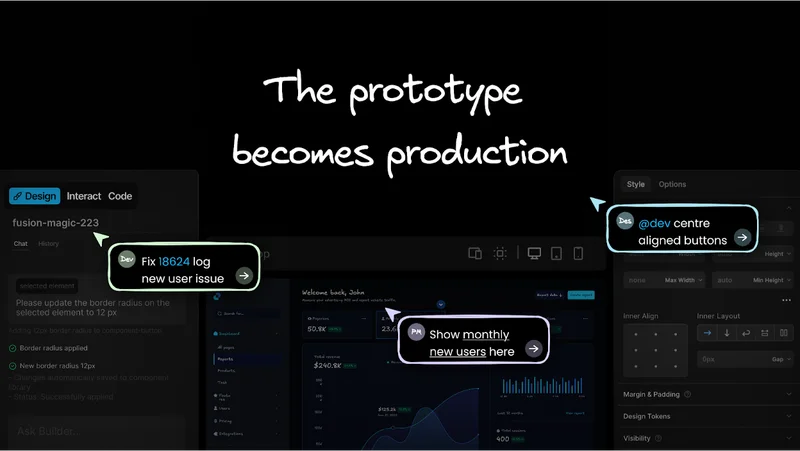
Once the initial build is done, the platform gives every role a way in. Designers select elements directly in the visual editor, prompt the agent to adjust spacing, color, or component choice, and see the change in context immediately. PMs prompt the agent directly for small fixes and review the result. QA flags an issue, the agent addresses it, and they verify the fix on the spot.
In the workshop, participants switched between interact mode (prompting for new features), style mode (editing visual details on selected elements), and plan mode (collaborating with the agent on strategy before building). The agent indexed recommendations against the design system, surfaced high-impact options, and let users choose what to implement.
Engineers stop being the middleware for every decision that doesn't require engineering expertise. Their job becomes reviewing code and owning architecture. Everything upstream of that, the iteration, the refinement, the "can we move this button,” happens without them.
Review before the PR, not after
Most teams do QA and design review after engineering builds something, which means feedback always creates rework.
In an AI-native workflow, every branch has a shareable preview URL. Stakeholders can test the feature before a pull request is ever opened. Design can approve the implementation. Product can validate the flow. QA can run through the happy path. By the time a PR hits engineering, it's already been verified by everyone who has an opinion about it.
What engineers receive is a PR that's been reviewed, tested, and approved by the people whose feedback would have created rework cycles anyway. The code review is about code quality, not relitigating product decisions.
Fewer rework cycles. Less back-and-forth. Work that arrives at engineering is ready to merge.
The prototype becomes production
Most teams miss the same thing about prototyping: they build it wrong.
A prototype built in Figma is thrown away when engineering starts, and one built in a sandbox is discarded during integration.
In the workshop, participants built on a real codebase. The prototype and the production code were the same thing. When the session ended, participants could download their code, open a pull request against the origin repo, or keep iterating in the platform. Nothing got thrown away. The prototype became the starting point for the real thing.
This collapses one of the most expensive parts of the product development cycle, the gap between "we validated this" and "engineering rebuilt it from scratch." If the prototype runs on your design system and codebase, there's no rebuild, just a PR.
What this requires from your team
None of this works if only developers can access it.
The whole model depends on every role being able to contribute without a local dev environment, without understanding how to write a PR, without needing a developer to translate their feedback into action. The platform must be accessible to a PM, a designer, and a QA engineer on the same branch at the same time, each working on a task aligned with their expertise.

It also requires something harder than tooling. Your team has to change how it thinks about the development cycle. The instinct, especially for engineers, is to front-load: define everything, lock it down, then code. That instinct made sense when code was expensive. It doesn't anymore.
The teams shipping fastest right now start with code and let feedback shape what it becomes.
If you want to run this workflow with your own team, the how-to guide walks through every step in detail, from your first branch to a merged PR, with every role participating directly.
Watch our workshop session where we take a real idea and ship it to production together, in real-time.