Agent-Native: The Next Architecture for Software
Most software today gives you one of two compromises: a polished interface an agent cannot fully use, or a powerful agent with no real interface for humans. Agent-native architecture removes that trade-off.
Agent-native applications are software built so humans and AI agents can operate the same product through shared actions, data, permissions, and context. You may use a visual interface, while the agent may use natural language and tool calls, but both paths work inside the same application model.
This is the architectural line between an AI feature and an agent-native product. The agent is not bolted onto the app after the fact. It is part of how the app is built.
Table of contents
- Why SaaS and raw agents solve different halves
- AI-enabled to AI-native to agent-native
- What makes an application agent-native?
- What agent-native apps need as they grow
- Why agent-native apps should be cloneable
- Where agent-native fits in the software stack
- What agent-native looks like in practice
- How to get started with agent-native
The problem: SaaS and raw agents solve different halves
SaaS gave developers and teams a clean bargain: stop maintaining software, rent a polished product, and accept whatever shape the vendor gives you. That bargain worked for a long time, especially when software mostly needed to give people a workflow, a database, and a UI.
AI agents changed the bargain.
The problem is not that SaaS products lack AI features. Almost every software company is adding them. The problem is that most products were not designed for an agent to operate them completely. A chatbot in the corner can summarize a document or draft a response, but it usually cannot do everything you can do in the product. It cannot reliably see the same state, use the same workflows, or change the product through the same primitives as the interface.
That is why bolt-on AI eventually hits a ceiling.
Raw agents have the opposite problem. Tools like Claude Projects and general-purpose coding agents can be extremely powerful, but they often start as a blank text box. That blank canvas problem is intimidating for teams. There are no buttons, no durable workflows, no obvious starting points, and no domain-specific interface that makes the right action feel natural.
The result is a split:
| Option | What works | What breaks | What you want |
|---|---|---|---|
SaaS | Polished UI, clear workflows, team adoption | Agent access is partial or bolted on | A real UI that an agent can fully operate |
Raw agents | Flexible, powerful, natural language control | Blank canvas, weak product shape, little workflow guidance | Agent power with product structure |
Internal tools | Custom logic and data access | Maintenance burden, AI added after the fact | Custom software where the agent is core |
Agent-native apps | UI and agent share the same app model | Requires a different architecture | Human and agent collaboration without trade-offs |
Raw agents give you power without enough product shape. SaaS gives you product shape without full agent access, ownership, or customization. Agent-native apps combine the structure of SaaS with the flexibility of agents.
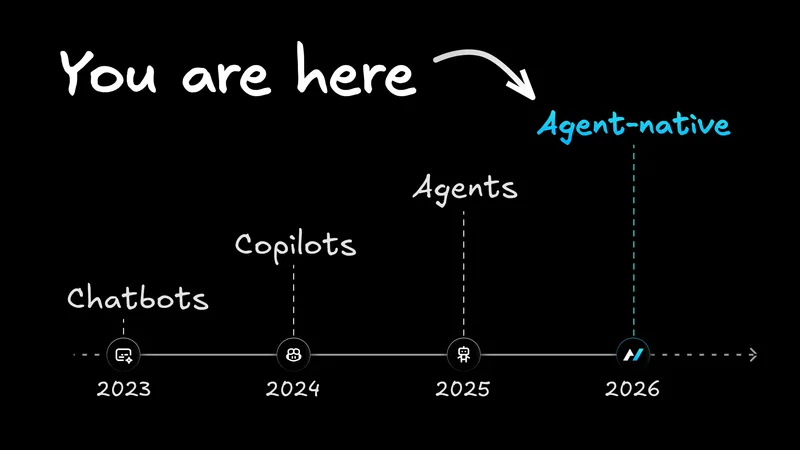
The evolution: AI-enabled to AI-native to agent-native
"AI-native" is already used across the industry, but the term is too broad to describe the next architecture of software. Some teams use it to mean infrastructure optimized for AI. Some use it to mean products where AI is central. Some use it to mean any product with an AI workflow.
Agent-native is more specific.
It is the architectural discipline of building applications so agents and humans can operate the same product from the start.
| Stage | What it means | Test | Example pattern |
|---|---|---|---|
AI-enabled | The product has AI features, but the core product still works without them | Remove the AI. Does the product still basically work? If yes, it is AI-enabled | A project management app with an AI summary button |
AI-native | AI is central to the product's value | Remove the AI. Does the product collapse? If yes, it is AI-native | A coding assistant, image generator, or chat-first research tool |
Agent-native | AI is central, and the product also has a full human-facing interface that shares the same actions, data, and permissions | Can both the UI and the agent operate the same workflows? If yes, it is agent-native | An email client where you can triage manually and the agent can archive, draft, label, and route through the same underlying actions |
Adding AI to your app does not make it AI-native. AI-native means the product does not exist without the AI. Agent-native goes one step further: AI is central, and the product still has a real interface for humans.
The distinction matters because you should not have to choose between software you can use and software an agent can use. The same product should work both ways.
Mobile-native apps are the closest historical analogy. A mobile-native app was not a desktop website squeezed onto a small screen. It was designed around the constraints and strengths of mobile from the beginning: touch, camera, location, limited screen space, intermittent attention.
Agent-native apps are the same kind of shift. They are not SaaS products with AI squeezed into the corner. They are designed around the constraints and strengths of agents from the beginning: natural language, tool use, context, background work, and human supervision.
What makes an application agent-native?
An application is agent-native when the human interface and the agent are two ways of operating the same product. You may use screens, forms, buttons, keyboard shortcuts, and visual review flows. The agent may use natural language, tools, protocols, and background execution. But both are grounded in the same actions, data, permissions, and context.
The distinction comes down to five architectural principles.
1. Agent UI parity
Agent UI parity means anything the UI can do, the agent can do. And anything the agent can do should be visible, inspectable, or controllable through the product's interface, logs, permissions, or state.
The core test is simple. If you can archive an email, create a dashboard, schedule a meeting, update a record, or render a video, the agent should be able to perform the same action through the same application capability. The agent should not be screen-scraping the UI or using a fragile side-channel. It should call the same underlying capability that powers the product.
A chat panel on the side can be useful, but it cannot be the architecture. The agent needs access to the product's actual capabilities.
Consider an email app. A normal AI feature might draft a reply. That is useful, but shallow. An agent-native email app lets the agent draft the reply, inspect the thread, apply labels, archive notifications, route customer messages, pull context from a CRM, and leave the final send decision to you when needed. The agent is operating the email product, not merely commenting on it.
2. One shared action model
Agent UI parity only works when the same capability is not rebuilt for every surface.
In traditional software, a team might implement a UI action, then an API endpoint, then an automation hook, then an LLM tool definition, then a CLI command, then documentation explaining how all of those relate. Every copy creates drift. The UI can do one thing. The agent can do a narrower thing. The API exposes something slightly different. Eventually, nobody trusts the abstraction.
Agent-native architecture needs one action model.
Define the action once: archive an email, create a dashboard, render a video, schedule a meeting, invite someone, update a record. From that single definition, the UI can call it, the agent can see it as a tool, external clients can reach it, and other agents can route to it through the supported protocols.
In code, the pattern looks like an action definition rather than a pile of one-off integrations:
That single action can become a UI mutation, an agent tool, an HTTP endpoint, a CLI command, an MCP tool, and an A2A tool. The product capability is defined once, then exposed through every surface that needs it.
3. Shared state, data, and context
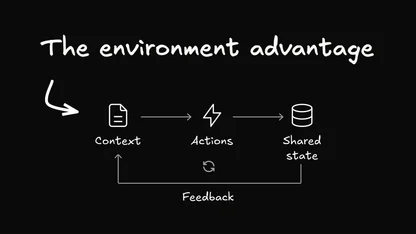
An agent-native app cannot treat the agent as a separate background process. The agent needs to know what you are looking at, what is selected, which filters are active, and what changed while it was working.
In practice, context awareness means the UI writes navigation state as you move through the app; a view-screen action gives the agent a fresh snapshot of the current view; and a navigate action lets the agent move the UI when you ask it to open a record, thread, chart, document, or task.
This is why agent-native apps feel different from chatbots attached to products. If you highlight a paragraph and ask for a rewrite, the agent should know which paragraph. If you are looking at a customer account, the agent should operate on that account. If the agent creates a draft, updates a dashboard, or marks a task complete, the UI should refresh because both sides read and write the same database-backed state.
Live sync does not need to mean fragile browser automation or long-lived infrastructure. The framework pattern can stay intentionally simple: actions write to SQL, a version changes, and the UI polls for updates and invalidates the right data. The important principle is not the polling interval. It is that the database is the coordination layer between the human interface and the agent.
4. Protocol-ready by design
Agent-native applications are not isolated chatbots. They are software nodes that agents and other apps can use.
That means protocols matter. An agent-native app should be reachable through standard agent interfaces such as MCP, so tools like Claude Code, Codex, Cursor, Builder.io, or other MCP-compatible clients can understand and operate it. It should also support agent-to-agent communication, so one app can ask another app to do work.
The important part is that protocol support is not a one-off integration project. It is a property of the app architecture. If actions are already the shared unit of product behavior, exposing those actions to MCP, A2A, a CLI, or an internal API becomes a routing problem rather than a second product.
An analytics app should be able to ask a slide app to turn a dashboard into a deck. A calendar app should be able to coordinate with an email app to propose meeting times. A dispatch agent should be able to route work across an ecosystem of apps without each team writing bespoke glue code every time.
5. Governed execution
The final test is whether the agent can act inside the same permission model as the product.
If you cannot access a customer record, the agent should not be able to access it on your behalf. If sending an email, deleting a file, publishing a page, or changing a billing setting requires confirmation, the agent should respect that same boundary. If a team needs to know what happened, the product should expose logs, audit trails, and state changes in a way humans can inspect.
This is where agent-native stops being a clever interface and becomes an application architecture. The agent is powerful because it can act. The product is trustworthy because those actions are scoped, reviewable, and reversible where needed.
What agent-native apps need as they grow
The principles above define the minimum. But the real promise of agent-native software is not just that an agent can click the same buttons you can. It is that the product can become more personal, more programmable, and more collaborative as you use it.
These layers are not all required for the first version of an agent-native app. A personal prototype can be agent-native before it has team governance, runtime tools, or an observability dashboard. But as soon as agent-native apps move from demos into repeated work, these capabilities start to matter.
Workspace customization
Agent-native is not only about exposing product actions to an LLM. It also gives each person and team a customization layer normally reserved for developer tools.
A mature app should ship with a workspace: AGENTS.md for shared instructions, LEARNINGS.md for durable team memory, personal memory, skills, custom sub-agents, scheduled jobs, and connected MCP servers. The important architectural detail is that these resources live in SQL rather than on a local filesystem.
That changes the economics of customization. Claude Code and Codex already show how powerful agent workspaces can be when instructions, skills, memory, and tools travel with a project. But that model is usually organized around developer workflows: repos, local environments, source control, and project files. An agent-native app brings the same pattern into the product itself, where workspaces are database-backed, scoped by person or organization, and editable inside the app.
This matters for adoption. You do not just want a smarter default app. You want an app that learns your workflow, remembers team conventions, supports reusable instructions, and lets specialists shape the agent without waiting on a product roadmap.
Runtime tools and automations
As agent-native apps mature, people start wanting a layer for work that is smaller than a permanent product feature but more durable than a one-off chat response.
Runtime tools fill that gap. A tool can be a private dashboard, calculator, monitor, data lookup, or small interactive utility the agent creates inside the app without a code change, build, deploy, or migration. If it becomes core to the product, it can later graduate into a template feature. Until then, it gives you a way to customize the app immediately.
Automations do something similar for background work. You should be able to say, "When an enterprise lead books a meeting, post the details to Slack," or "Every Monday, summarize last week's support threads," and have that become a scheduled or event-triggered workflow with the same actions, permissions, secrets, and audit surfaces as the rest of the product.
Progress and observability
Long-running agent work also needs product-grade visibility. Progress state, notifications, traces, feedback, evals, and cost/latency metrics are not enterprise extras; they are how humans supervise autonomous software. If the agent is triaging 128 emails, importing a dataset, or rendering a video, you should see what is happening, where it is stuck, what it cost, and what it changed.
Observability is especially important because agent-native products do not fail like normal SaaS products. A button either worked or it did not. An agent may choose the wrong tool, skip a step, spend too much, get confused by stale context, or do the right thing for the wrong reason. Traces, evals, feedback, and audit surfaces give teams a way to improve the agent instead of guessing.
Team readiness
The individual developer path matters because bottom-up adoption is how many developer tools spread. Someone clones an app on a weekend, uses it for a real personal workflow, then brings it to work because it is already useful.
But the team layer still cannot be an afterthought.
Once a company has several agent-native apps, unmanaged autonomy becomes chaos. Who has access to which app? Which LLM key is being used? Which data can the agent read? Which actions require approval? How do you audit what happened? How do you share a workflow without making everything public?
Teams running agent-native apps eventually need team primitives: users, organizations, roles, permissions, shared workspaces, private-by-default data, auditability, and governance.
Open source templates make it possible to clone and build agent-native apps. As those apps spread inside a company, the architecture needs an operational layer for hosting, auth, database management, branching, provisioning, and controls.
Why agent-native apps should be cloneable
Cloneability is where the agent-native idea becomes practical for developers and teams.
SaaS products often make your own data feel rented. Your calendar, analytics, email history, support tickets, calorie logs, and customer records sit behind a vendor's product assumptions. You can export some of it, query some of it, automate some of it, and customize very little of it.
Agent-native apps push in the other direction: clone the software, own the code, own the database, and change the product when the default shape no longer fits.
At some point, many SaaS interfaces become walls around your own data.
That sounds abstract until you hit the first question the product did not anticipate. A calorie tracker might show you weekly trends, but not answer, "Which foods correlate with my worst sleep when I eat them after 8 p.m.?" A dashboard tool might show revenue by segment, but not run the exact exploratory analysis your team needs today. A SaaS email client might help you move faster, but it will not let you rebuild the inbox around your company's internal routing logic.
When you own the database and have an agent, you can ask questions the original developers never thought to answer.
That is the economic and practical argument for cloneable SaaS: full products you can clone, own, and reshape instead of endlessly subscribing to generic software. Cloneability is how agent-native software breaks out of one-size-fits-all SaaS.
Where agent-native fits in the software stack
Once agent-native is defined, the comparison becomes more practical. SaaS, raw agents, and internal tools each give you something useful, but each leaves a gap. This table shows where those gaps appear: control, UI quality, agent access, customization, ownership, team readiness, observability, and cost.
| Dimension | Traditional SaaS | Raw agents | Agent-native applications |
|---|---|---|---|
Who controls it? | Vendor controls the product shape | User controls prompts and connected tools | Developer or team controls the app, data, and agent behavior |
Human UI quality | Usually strong | Usually weak or nonexistent | Full product UI |
Agent access | Partial, often bolted on | Broad but unstructured | Full access through the app's own actions |
Customizability | Limited to settings and integrations | Flexible but not durable product customization | Code and workflows are cloneable and changeable |
Data ownership | Vendor database | Depends on connected tools | Your database, your schema, your exports |
Runtime customization | Vendor roadmap or plugin marketplace | One-off prompts and tool calls | SQL-backed workspaces, runtime tools, and automations |
Context awareness | UI state is usually hidden from the agent | Depends on manual prompting | Agent sees current view, selection, navigation, and app state |
Team readiness | Mature admin features, limited AI governance | Hard to govern as a product | Designed for users, orgs, permissions, sharing, and auditability |
Observability | Product analytics, limited agent traces | Chat history and tool logs | Progress, traces, evals, feedback, cost, latency, and audit trails |
Monthly cost pattern | Per-seat subscriptions, often plus AI add-ons | LLM usage and tool subscriptions | One shared LLM key can power many owned apps |
Best use case | Generic workflows that do not need deep customization | Open-ended reasoning and one-off work | Durable apps where humans and agents collaborate on real workflows |
Over time, applications an agent can fully operate will replace applications where AI can only talk about the work.
That does not mean every app becomes a text box. It means every serious app needs to expose its real capabilities to an agent while preserving the interface humans need to inspect, supervise, correct, and collaborate.
What agent-native looks like in practice
The easiest way to understand agent-native is to look at the kinds of products it makes possible.
Traditional email clients optimize for faster human triage. Agent-native email changes the unit of work. You can still use the inbox manually, but the agent can also summarize threads, draft replies, apply labels, archive low-value notifications, route customer messages, and pull relevant context from connected systems.
You can try this pattern in the agent-native mail template: a familiar inbox you can clone, customize, and operate with an agent.
Analytics
Traditional analytics tools make teams define dashboards, queries, charts, and permissions through a UI. Agent-native analytics lets you ask for a dashboard in natural language, inspect the result visually, then ask follow-up questions against the same underlying data.
The point is not just "chat with your data." The point is that the chart, the query, the dashboard, and the agent's analysis all belong to the same application. The agent can build the dashboard, and you can edit it.
You can try this pattern in the agent-native analytics template.
Calendar
Calendar software is already full of repetitive agent-shaped work: find a time, reschedule this meeting, protect focus blocks, propose slots to a customer, coordinate across teammates, and follow up when nobody responds.
An agent-native calendar gives you a real calendar UI while giving the agent the ability to manage scheduling through the same actions. It can also talk to other apps, such as email or contacts, because scheduling rarely lives inside the calendar alone.
You can try this pattern in the agent-native calendar template.
Clips
Video and screen-recording tools are inherently shareable. When someone sends a clip, the recipient sees the product in the act of consuming the content. That is why this category spreads naturally.
An agent-native clips app can preserve that viral loop while making the workflow programmable. The agent can help cut, summarize, title, organize, and route videos, while you still have a normal interface for recording and sharing.
You can try this pattern in the agent-native clips template.
Video
Agent-native video turns motion graphics into software the agent can operate. Instead of opening a heavy editor for every change, you can describe an animation: add a title card, retime this section, change the easing curve, render an MP4, or create a new composition.
The UI still matters. You still need a timeline, preview, controls, and export state. But the agent can manipulate the same composition model directly. That is the agent-native pattern: natural language control without losing the product surface.
You can try this pattern in the agent-native video template.
How to get started with agent-native
There are two practical paths.
The individual path is to clone a template at www.agent-native.com/templates, use your own LLM key, and try it on a real workflow. Email, calendar, analytics, clips, video, content, forms, and other templates are useful because they start from software you already understand. The blank canvas problem disappears when the agent lives inside a working app.
The team path starts when a template becomes valuable enough to share. The question shifts from "Can I use this myself?" to "Can my team trust this?" That requires hosting, database management, auth, permissions, branching, governance, and shared key provisioning. Builder.io is the team layer for that step: a way to host, share, govern, and manage agent-native apps once they move beyond a personal clone.
Clone a template this weekend. Use your own API key. The agent is already there.
Frequently asked questions
What is an agent-native application?
An agent-native application is one where the UI and the agent are two surfaces over the same product. If you can create, edit, approve, delete, search, schedule, or publish something in the interface, the agent should be able to perform that same action through the application's own action model, with the same permissions and auditability.
How is agent-native different from AI-native?
AI-native means AI is central to the product. Agent-native is more specific: the product is built so an AI agent and a human-facing UI share full access to the application's capabilities. An AI-native product may be only a chat interface. An agent-native product combines agent power with a durable app interface.
What is agent UI parity?
Agent UI parity is the principle that anything the UI can do, the agent can do too. If you can archive an email, create a dashboard, schedule a meeting, or render a video, the agent should be able to perform the same action through the same underlying application capability.
What programming stack do agent-native apps use?
The stack depends on the framework and template, but the important pattern is that application actions are defined once and exposed to both the UI and the agent. In practice, an agent-native app commonly combines a modern web UI, a database the owner controls, typed actions, and agent protocols such as MCP.
Is agent-native only for enterprises?
No. Agent-native adoption should start with individual developers because personal workflows are the fastest way to prove value. Enterprise needs appear later: team permissions, shared keys, governance, auditability, hosting, and compliance. The same app model should support both paths.
TL;DR
- Agent-native applications are built so humans and AI agents operate the same app.
- The core principles are agent UI parity, one shared action model, shared state and context, protocol readiness, and governed execution.
- Agent-native is more specific than AI-native because it requires both agent capability and a real human-facing interface.
- Cloneable apps change the economics: own the code, own the data, and use one LLM key across many apps.
- SQL-backed workspace resources, automations, runtime tools, progress, and observability make agent-native apps stronger as they grow.
- The open source framework and templates are the starting point. Team governance, hosting, auth, and sharing can come later without changing the core model.
The next version of the apps you use every day will be agent-native. The question is whether you clone them, build them, or wait for someone else to define the category.
Explore templates at www.agent-native.com/templates. They are free and open source.