Fast coding hasn't made teams ship better because the delays live in handoffs, not in typing. Working from a single shared prototype closes that gap.
Most software teams run on the same process shape. A PM writes a spec grounded in a business goal. That spec goes to a designer. The designer works up the visuals and hands them to engineering. Engineering builds. Design reviews. The PM reviews. Something gets kicked back. A flow feels off, the layout needs work, and the whole thing loops back.
User testing sits at the very bottom. By the time you get there, you've spent four to six weeks, sometimes months, and you're staring at the question nobody wants to ask: Is this actually what the user needed?
Every handoff in that chain costs you a week or two. Every handoff also loses fidelity. The PM pictures one thing, the designer another, the engineer a third, and the user something different from all of them. Feedback arrives three sprints deep, and by then you've built the wrong thing and have to add more sprints to fix it. The inputs are scattered, too. PMs live in Jira and Notion, designers in Figma, and engineers in their IDEs. Keeping context in sync across those tools burns time and money, and it rarely produces the thing the user actually wanted.
Building fast stopped being the hard part a while ago. Coding agents are getting better, the cost of writing code keeps trending down, and most teams can now ship something quickly. Knowing what to build is the real work now, and that depends on how fast you can learn from what you ship. That learning loop is where the backlog problem AI didn't solve actually lives.

Why the old process keeps delivery flat
You designed your workflow around the assumption that code is slow and expensive. So you stacked steps in front of coding to make sure you never wrote the wrong thing. Meetings, planning, design, more planning, and only then implementation. That gives you a waterfall, and everybody agrees waterfall is bad even as they keep using it.
The reason teams fall back on it is simple. Agile only works when the people involved can complete a full cycle on their own, and that takes people who can carry product sense, design, and code all at once. Those people are rare and hard to hire. When you can't staff that way, you split the work into roles and connect them through handoffs. The handoffs are the queues, and the queues are where weeks disappear.
Dropping AI into that process changes the coding step and leaves everything around it untouched. The work still sits in a queue waiting for the next person, exactly as before. That's why organizations spend a fortune on tokens and watch org-wide delivery stay flat. We wrote more about why AI alone won't save your development process if the process itself stays the same.
Center the team on one prototype
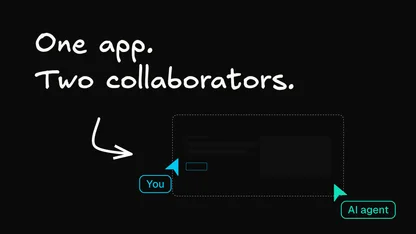
There's a better shape. The product trio (PM, designer, engineer) works best when it stops running in separate lanes. Rather than a spec that turns into a design that turns into code, everyone works from a single prototype from the very start.
The PM shapes it, grounded in real data and the metrics the business cares about this quarter. The designer makes it look right and stay on-brand. Engineers confirm the code fits the codebase, withstands long-term maintenance, and integrates with the rest of the system. One artifact, one source of truth, high fidelity, running on your real code and design system.
That shape lets you test with users earlier and far more often, because you're not protecting weeks of sunk work every time you want feedback. You iterate on real reactions while everyone is still in the same place, which is the whole idea behind code as the shared canvas for the team.
Meet each role where they already work
The model only holds if it fits how people work today. Engineers stay in their IDE. Designers stay close to the Figma workflow they know. PMs keep managing tickets and talking to customers. The shared prototype has to sit in the middle of all that without asking anyone to abandon their tools.
Start by having an engineer work locally in Cursor or VS Code. They push their branch up to a shared cloud environment with a CLI command, and that environment is connected to the same repository, wrapped in a visual editor with an AI chat, live preview, and commenting. The engineer adds the logic for something like a password reset, tags a designer as a reviewer, and leaves a comment describing what's needed. No Figma file to reproduce, no back-and-forth to interpret what the design meant.
The designer picks it up from a notification, sees the comment, and works in a preview that already understands the app's look and feel. Design system indexing means the AI uses your real components, so the output looks like code an engineer would write. The designer prompts the change in plain language, selecting elements directly to specify exactly what to modify. For smaller tweaks, they edit visually, as they would in Figma, and those changes are translated into code. When it's done, they either open a pull request or hand it back to engineering for review of the diff.
The whole thing runs on branches, so parallel workstreams keep moving. Kick off one change, switch to another branch, and the first keeps running in the background. That parallelism enables agents to work for the entire team at once rather than for a single engineer at a time.

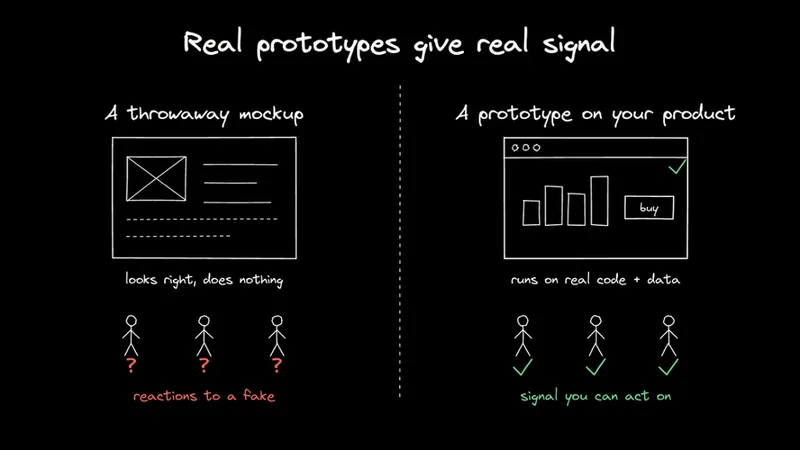
PMs get their own paths in. Connect the environment to Jira via MCP, and a designer or PM can reference a ticket number to have the agent pull the acceptance criteria and complete the work. Connect it to Slack, and an idea raised in a customer channel becomes a working prototype without leaving the thread. Tag the agent, and it spins up a branch and builds the change on your actual product, not a throwaway mockup. When a good idea surfaces in a customer conversation, you have something to react to in minutes rather than a note that falls into the backlog.
Make the PM and designer part of every build, without being in every build
Here's where the model compounds. A PM's judgment can live in a skill. Encode the company context, the personas, the jobs your customers are doing, and the metrics you're moving this quarter, and every feature gets evaluated against that criteria as it's generated. The PM doesn't have to sit in each prototype for it to carry a PM's sensibility. Anything that's already being built already has a version of its sign-off baked in.
Same for design. A design system becomes a living artifact that informs everything generated. Designers update it as patterns change, and the prototype follows it without anyone checking every pixel. Engineers get the same guarantee from the codebase: with the code in context, generated output matches your existing patterns rather than inventing odd components or one-off functions.
Skills stay out of the way until they're needed. A rule fires on every prompt, clogging the context window. A skill activates only when the work matches its description, so a spec generator runs when someone asks for a spec and stays dormant otherwise. You can point a skill at other skills or at the tools available in the chat, so it grows as complex or stays as simple as the job requires. If you find yourself doing the same thing over and over, that's the signal to make it a skill, and once it's in the project, everyone on the team can use it.
Plan mode helps you think a feature through before you build it. It produces a markdown plan anchored in your codebase that you can take to an internal meeting or share with a few customers to validate, then switch into build mode to implement. Build mode does what it sounds like. Plan mode is for the moment when you're weighing which direction to take and want the analysis grounded in your real system rather than a whiteboard guess.
Close the loop with real users, fast
The point of all this is the feedback cycle. Any branch has a shareable preview URL that runs the real application with your changes. Send it in an email or a Slack thread, or point a user testing platform at it to get feedback from real people. If that platform has an MCP server, connect it in and prompt against the testing data directly, so the next iteration builds on what you actually learned rather than what you assumed.
A PM can take one requirements doc and spin up three variations from it, one conservative, one modern, one experimental, then put all three in front of users and let the responses drive the decision. The prototypes are built on your real product, so the feedback you get is a production-quality signal, not reactions to a mockup that behaves nothing like the finished thing.

That's the compounding effect. Your team collaborates in one place. Designers keep the styling consistent, engineers keep the code quality where they want it, and PMs steer product direction with a clearer signal and faster turns. You get feedback early, act on it, and move to the next thing, which roughly shapes the new path from prototype to production.
Where the work comes together
Builder is where this workflow runs. It connects to your real codebase and design system and gives every role a shared surface to work on, so the prototype stays live, and queues between handoffs shrink. Engineers keep their IDE, designers keep their Figma workflow, and PMs keep their tickets. The prototype ties it all into one working artifact that everyone can build on.
Watch our recent webinar, where we walk through this whole workflow live, including demos of each step: pushing a branch into a shared environment, handing off design work through comments, wiring in Jira and Slack, and closing the loop with preview links and user testing.