Claude Code Subagents: How to Create, Use, and Debug Them
Claude Code feels great—right up until your main thread turns into a pile of logs, grep output, and dead-end research, and you see the dreaded "compacting" start.
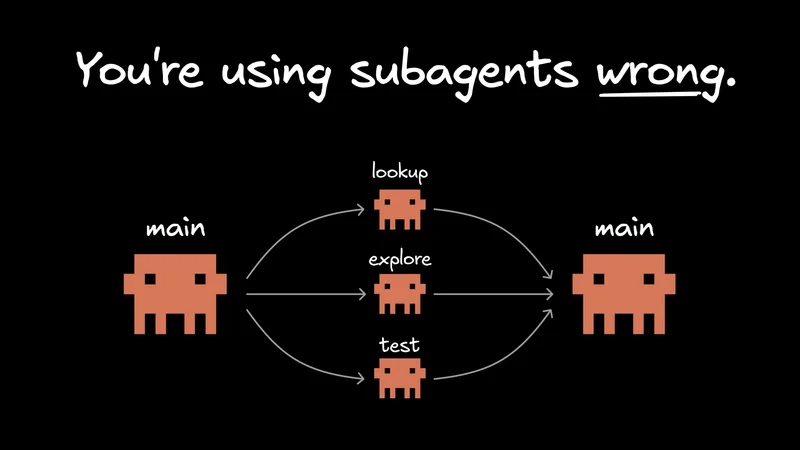
Claude Code subagents help by offloading that noisy side work to specialized workers with their own prompt, tool access, permissions, and optional memory, then returning a clean summary to the main session.
This guide covers what subagents are, how to create them, where they help most, and when the handoff overhead just isn’t worth it.
What are Claude Code subagents?
Claude Code subagents are specialized workers that run in separate context windows, each with their own prompt, tool access, permissions, and optional memory. They’re useful for side work you want to keep out of the main session, like repo exploration, docs lookup, test runs, and result validation.

Anthropic describes them as custom assistants for specific kinds of tasks. Claude uses a subagent’s description as a routing hint when deciding whether to hand work off to it, so a good subagent is more than a persona. It’s a clearly scoped workflow with the right tools and instructions for a recurring job.
Claude Code already includes versions of this pattern. Explore and Plan are read-only helpers for reconnaissance, while the general-purpose agent handles broader multi-step work. Custom subagents become useful when you want your own repeatable version of that workflow for tasks you do regularly.
A simple mental model is: CLAUDE.md holds ongoing project context, skills store reusable playbooks, and subagents handle isolated tasks where the main session only needs the result.
Why do Claude Code subagents matter when context is the real bottleneck?
In long Claude Code sessions, the real limit usually isn’t capability. It’s context. Even a simple task can turn into file reads, tests, doc searches, log checks, and plenty of dead ends. Before long, the conversation gets crowded with raw artifacts instead of the decisions that actually matter.
That’s where subagents help. They take on bounded, noisy work in separate threads and return condensed results to the parent session. Instead of carrying every search result or debug note forward, the main conversation keeps the conclusions, tradeoffs, and next actions.
They also make parallel work practical. One subagent can inspect the data layer while another traces UI entry points or gathers documentation, then each reports back with a summary. The benefit isn’t just speed—it’s preserving space in the main context window for higher-level reasoning.
How do you create and configure Claude Code subagents?
You can create Claude Code subagents either from the /agents UI or by writing Markdown files with YAML frontmatter. The main things to get right are scope, description, tool access, permission mode, and prompt design.
Anthropic supports project-level subagents in .claude/agents/ and user-level subagents in ~/.claude/agents/. Project-level definitions are usually the better default when a workflow depends on a codebase’s conventions. User-level agents are a better fit for portable habits, like repo exploration or docs lookup.
The Markdown file does two jobs: the frontmatter configures the agent, and the body becomes its system prompt. One easy-to-miss detail from Anthropic’s docs is that subagents do not inherit the full default Claude Code system prompt. They get their own prompt plus basic environment details, which makes them easier to shape deliberately.
A good starting pattern for a read-only repo explorer looks like this:
That definition works because each field reinforces the same job: the description helps Claude route to it, the tool access matches the task, and the prompt defines the output.
You can also configure fields like model, maxTurns, mcpServers, hooks, background, and isolation. In practice, though, the most useful fields are usually the simple ones. Start with a sharp description, narrow tools, and the smallest permission surface that still gets the job done. Turn on background: true when a worker can run concurrently without needing clarifying questions. Use isolation: worktree when parallel edits might collide and you want file-system separation.
Claude may delegate automatically, or you can force a specific worker with an @ mention. You can also run an entire session as a single agent with claude --agent <name>.
What makes a good Claude Code subagent?
Once you’ve created a few subagents, the next challenge is making them specific enough to be genuinely useful. The best ones are narrow, shaped around a repeatable job, and easy for Claude to route correctly.
Start with job-shaped names like repo-explorer, test-runner, pr-reviewer, and docs-researcher. Claude tends to route to those more reliably than generic names like frontend-engineer, which sound flexible but give weaker signals and often lead to bloated instructions.
Descriptions matter just as much as names. If the real task is “inspect auth changes and look for unsafe patterns,” say that plainly. Action-oriented language works better than vague capability language. If a subagent keeps misfiring, check the description before you start tweaking the prompt body.
Keep tool access tight. If an agent only needs Read, Glob, and Grep, there’s no reason to give it write access just for convenience. Tightly scoped agents are easier to trust, cheaper to run, and generally much easier to debug.
When a task benefits from persistence, have the agent produce a durable artifact like research.md, plan.md, or review-notes.md. That gives your main session something concrete to verify, edit, and reuse.
Reviewer agents are an especially good fit because they benefit from a clear checklist, a limited toolset, and a crisp output format.
What are the best real-world use cases for Claude Code subagents?
The best Claude Code subagent use cases are noisy, self-contained tasks where the main session only needs a summary or recommendation back.
Repo exploration is one of the clearest wins. In an unfamiliar codebase, a repo explorer can inspect entry points, trace data flow, and spot conventions, then return a short brief instead of filling the main thread with search output.
Docs lookup is another strong fit. Official docs, changelogs, and example repos can generate a lot of raw material quickly. A docs-focused agent can gather the relevant sources, summarize the differences, and point to the source you should actually trust.
Test runners and log investigators also pay off quickly. Instead of carrying every stack trace forward, the parent session gets the failing files, likely root cause, and the next thing to try.
Reviewer and checker agents are especially reusable. A TypeScript strictness checker, accessibility reviewer, or security reviewer can run near the end of a task and return a compact pass/fail-style summary.
A few concrete examples:
- repo-explorer: maps entry points, data flow, and likely risk areas in an unfamiliar repo.
- docs-researcher: pulls in official docs and release notes, then summarizes what matters for the task.
- test-runner: runs targeted tests, groups failures, and suggests the most sensible next debugging step.
- pr-reviewer: reviews changed files and gives feedback on code quality, testing, and maintainability.
- security-reviewer: reviews authentication, secret handling, and input boundaries without changing the implementation.
For more advice and helpful patterns, check out my article on when and how to use subagents. Subagents work best when the task is separable enough to hand off cleanly.
When should you not use Claude Code subagents?
Claude Code subagents are not a good fit for every task.
They come with setup, handoff, and context overhead. For small edits, tightly coupled work, or tasks that need constant back-and-forth, it usually makes more sense to stay in the main conversation.
You’ll see the failure mode quickly in feature work that spans multiple layers. Say you’re changing a schema, updating a server route, wiring up a React screen, and fixing the test suite in one pass. That kind of job depends on shared intent across every step. If you split it into too many isolated workers, the mental model can get fragmented, and you end up with awkward summaries and handoffs between phases.
Anthropic's docs are pretty clear about the limits. Subagents start fresh, so they need time to gather context. They also can't spawn other subagents. If you need fast collaboration across multiple phases, the handoff itself can end up being the problem.
A simple rule of thumb works well here: use a subagent when the work is noisy, bounded, and easy to summarize. Stay in the main conversation when the work is small, tightly coupled, or depends on a shared mental model that would get weaker after a summary pass.
How do subagents compare with skills, hooks, MCP, and agent teams?
Subagents are specialized workers inside a single Claude Code session. Skills store reusable instructions, hooks handle deterministic automation, MCP connects external systems, and agent teams coordinate separate collaborating sessions.
Here’s a simple decision table:
| Need | Best fit |
|---|---|
Ongoing project context | Rules |
Reusable instructions or workflows | Skills |
Deterministic automation before or after actions | Hooks |
External tools or data sources | MCP |
Delegated work where only the result matters | Subagents |
Multiple sessions coordinating as peers | Agent teams |
The most subtle distinction is between subagents and agent teams. Subagents stay inside one session and report back to the parent. Agent teams add peer coordination across separate sessions. As Anthropic's agent teams documentation explains, that coordination can use about 7x more tokens in plan-heavy workflows and comes with more operational overhead.
So the choice mostly comes down to communication. If the parent session just needs a clean result back, use a subagent. If multiple workers need to collaborate as peers, agent teams are the better fit.

If you're already using MCP heavily, it's worth reading our guide to Claude Code MCP servers alongside this one. MCP expands what an agent can access, while subagents put clearer boundaries around how that work gets done.
How should developers think about Claude Code subagents going forward?
The long-term value of Claude Code subagents is workflow standardization. They let you turn repeated instructions into reusable, scoped building blocks with their own prompt, permissions, and operating rules.
That’s why the feature feels like more than a convenience setting. If you keep repeating the same review loop, repo exploration prompt, or validation pass, that’s usually a sign the workflow wants a more durable shape.
Public adoption still seems early. One recent exploratory study of agentic coding tool configuration found that advanced artifacts like skills and subagents were often used pretty shallowly. That matches how the ecosystem feels right now: the ideas are solid, but the patterns are still settling.
So start small. Build one or two focused workers for exploration, review, or testing, then watch where the summaries help and where they hide too much context.
If you're already spending a lot of time in Claude Code, this roundup of Claude Code tips and best practices is a good next read. Look at the prompts you keep repeating and pick the noisiest one. That's usually the first subagent worth keeping.