How to build agent-native applications (and what not to do)
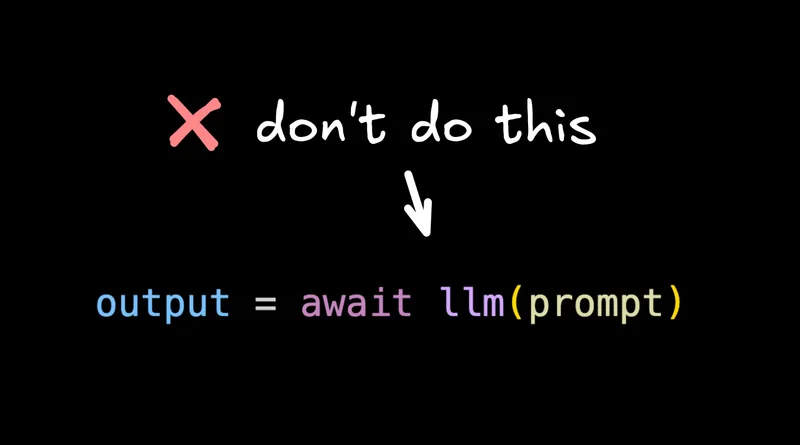
This is the biggest mistake I see people constantly make when building AI applications.
Let me show you how to make this substantially better.
Step 1: tools and a loop
First, we need two new things. We need tools and a loop. LLMs can't do anything on their own, but you can provide them tools — for an email app it could be draftEmail, searchEmails, etc.

You send a call to an LLM, it sends back what tools it wants to run, those tools execute, and then the results are sent back to the LLM on a loop until things are complete.

You can introspect each step. You can output each piece to the UI, like progress.

Step 2: stop assuming the AI is correct
But this still has one massive issue. We're still assuming the AI is correct.

In this case, we're just running through a loop and then doing something with the results without giving users a way to give the feedback that we know is so critical for non-deterministic systems.
So the better thing you can do is this: build a UI that shows the streaming result as the agent is outputting things. Give users a way to stop it, give feedback, queue the next message.

This is sort of the state of the art today. But I actually think we can do one solid step better.
Step 3: customization (instructions, skills, memory)
The reason things like Claude Code, Codex, and OpenCode are so powerful is there's a lot more customization you can do of your agents.

You can give them all kinds of custom instructions unique to you and your use case and your project. You can give them additional files as context that they can reference right from a file system. You can give them skills. They can keep track of their own memory as they learn and improve.
These things can make a crazy difference and are a big reason why Claude Code is exploding so much right now.
But then you're probably wondering: how do I provide all of that in my application? That's a lot to build.
I've personally come to the opinion that this is the better pattern that pretty much every application should adopt if possible. But it's true — it's complex to build a Claude Code fitted for your application that is user-friendly, has the right permissions and guardrails, and just generally makes sense.

Agent-Native
I've been working on an open source project called Agent-Native. It's very early, but it does a couple of interesting things.
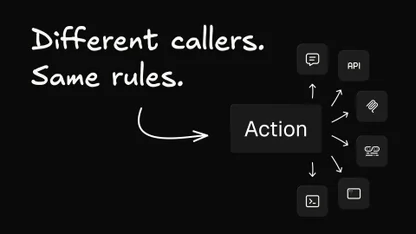
The first one is that your application is defined as a set of actions. These actions are exposed over APIs, so your frontend will use these same actions — for email, searchMail, draftMail, etc.

And these core actions the agent can use as well as tools. The agent has a bunch of built-in stuff that I'll show you.
You render the agent chat + workspace anywhere you want in your application, and then users can chat with that — or you can send messages to the agents from other parts of your app.

Because a great part of applications versus pure agents is you can have workflows and have buttons that give users guidance. But again, you don't want those buttons to just make an LLM call and just dump a result somewhere. You want them to go through an agent so you can look, modify, give feedback. It's influenced by those instruction skills and other customizations. And then if the output's not right, you can go back to the chat, tell it what it did wrong, and get it right the next time.

Of course you need some basics. The agent and the UI always need to be in sync — when the agent makes updates, the UI updates, and vice versa. That's what the framework provides.
So we have our standard chat, but we also have our workspace. The workspace is like a Claude Code or Codex workspace where you can have your instructions and skills and memories. You can add files, you can add subagents. You can really customize it. This is stored in a way where each user can customize their own experience however they want their agent to behave in your app — and at the organization level, you can set standards too. Then when you chat with the agent, it respects all of those things.
So I can jump in and say "add a new revenue dashboard," and based on how I set it up, it might know what all those things mean and start doing the right queries and calling the right tools to do that.
Agent + app, not either/or
And that's cool and all. We can go into full agent mode — where the agent fills the screen, and it's kind of like using a chat app entirely.
But I mentioned applications have a lot of value too, and I see people treating these things as way too either/or. I generally find most applications are better with a built-in agent, and most agents are better if they have UI capabilities. As you've seen recently in things like Cursor, Codex, and Claude Code, these tools can all generate UIs kind of — but again, they don't work like an application.
If I'm using an agent for analytics, I'll want it to save certain views as a dashboard. I want to choose who has access to the dashboard. I want it to work like an app, but I don't want to lose any of the agent affordances.
I also want buttons. And what's cool is the buttons can take prompts. When you say something like "make me a traffic and signups dashboard," when you submit, that gets delegated to the agent. You can see the agent work. It works identically to all those Claude Code and other products you're used to, but it's native to your application.
In this framework, the agent can also see what's on your screen, update what's on your screen, navigate you to other pages, and generally speaking: if the UIs can do it, the agent can do it. And if the agent can do it, the UIs can do it.
And this doesn't require any super complicated container setup or dev boxes running machines on them. You can deploy this anywhere. You can use any LLM that you want. You can use any Drizzle-compatible database or any SQL database effectively. And it's pretty easy to use — at least I think so.
Good, better, best

Whether you want something all-encompassing like this or you just want to integrate into an existing product, I hope this ladder of sort of good, better, best is helpful.
If you want to try out Agent-Native, it's over on GitHub, totally MIT licensed. There are a bunch of example apps you can just try out and get a feel for it. And while it's super duper early, I'd love your feedback — both on the general concept and, if you try it, on the implementation.
But what do you think? Are applications better off not integrating agents? Or are agents better than applications, and nobody will have a UI in the future — it's just gonna be agents and text in Telegram, and that's the only way you ever use products?
I'd love to know your thoughts in the comments. Let me know.