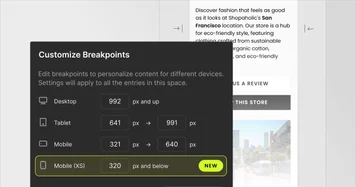
Add another breakpoint
A new Mobile (XS) breakpoint gives your team more flexibility for pixel-perfect responsive designs. Distribute breakpoint sizes however you like to get the best result. Learn more
A new Mobile (XS) breakpoint gives your team more flexibility for pixel-perfect responsive designs. Distribute breakpoint sizes however you like to get the best result. Learn more
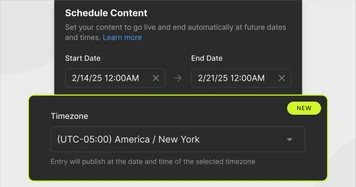
You can now easily choose a time zone when scheduling your content. With the new time zone functionality, you can ensure that your content goes live at the correct time anywhere in the world without the error-prone mental gymnastics of manually converting time zones. Learn more
Organize your images and video files into subfolders. Learn more
Visual Copilot now includes more choice while exporting your designs from Figma. The new Easy Mode is perfect for first-timers, letting you generate responsive designs without any setup. Precise Mode delivers pixel-perfect results when using Figma Auto Layout and syncs design changes to your code components. Learn More
Now you can copy any website layout to Builder with our Chrome extension. Hover over the section you want to copy, click, and paste it into Builder. Then, you can quickly edit and publish it or turn it into clean code for your codebase. Download it here.
We’re bringing our AI Assistant, Visual Copilot, to the Visual Editor. Using the new feature, you can use natural language to add functionality, animations, and real data from your APIs to designs in the visual editor - bringing designs to life. Learn more.
Developers can now generate automated tests directly from the Visual Copilot UI.
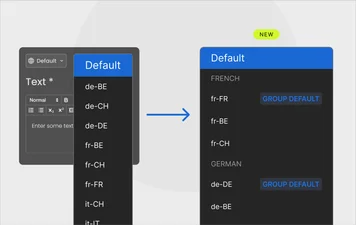
Locale grouping allows you to bucket locales into relevant groups so you can more easily manage many locales and introduce a secondary fallback system for locales that may share similarities. For example, French (Germany) and French (Belgium) can fallback to French (France), while English (Mexico) and English (Canada) fallback to English (US). Learn More