MCP Apps are the Future of Agentic Workflows
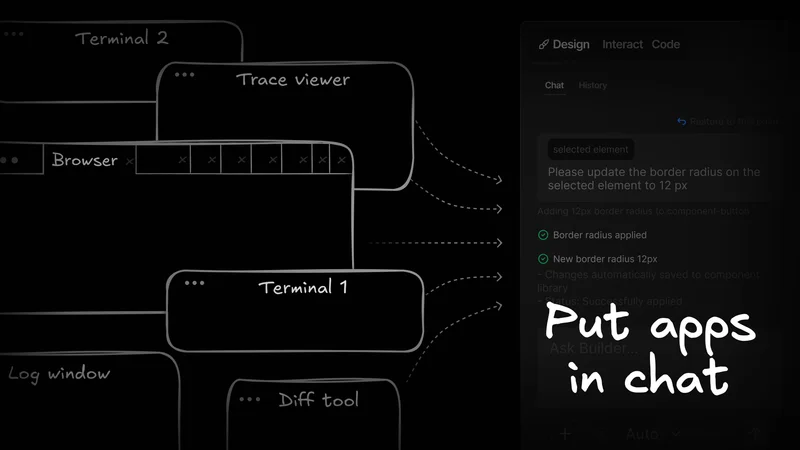
If you're coding with AI agents every day, you already know the sprawl. One terminal runs the agent. Another runs the build. Then you're bouncing around trying to remember where the diff actually went.
What if we stopped putting chatbots in all your apps and started putting apps directly in chat?
That's the idea behind MCP Apps, the official MCP extension for interactive UI. It gives hosts a standard way to render real interfaces such as diff viewers, tables, dashboards, and wizards right where you're already working with an agent.
The problem MCP Apps solve
Some workflows are naturally text-first. But a lot of what we do with agents is artifact-first:
- Reviewing diffs.
- Inspecting traces, logs, and timelines.
- Exploring tables and dashboards.
- Approving or editing real artifacts.
You can force those into chat, but it usually ends one of two ways: token-heavy scrollback, or a summary you don't quite trust.
Multi-agent workflows make this worse because they multiply artifacts. You end up living in 12 terminals and 20 tabs because the ticket, diff, logs, preview, and PR all live in different places.
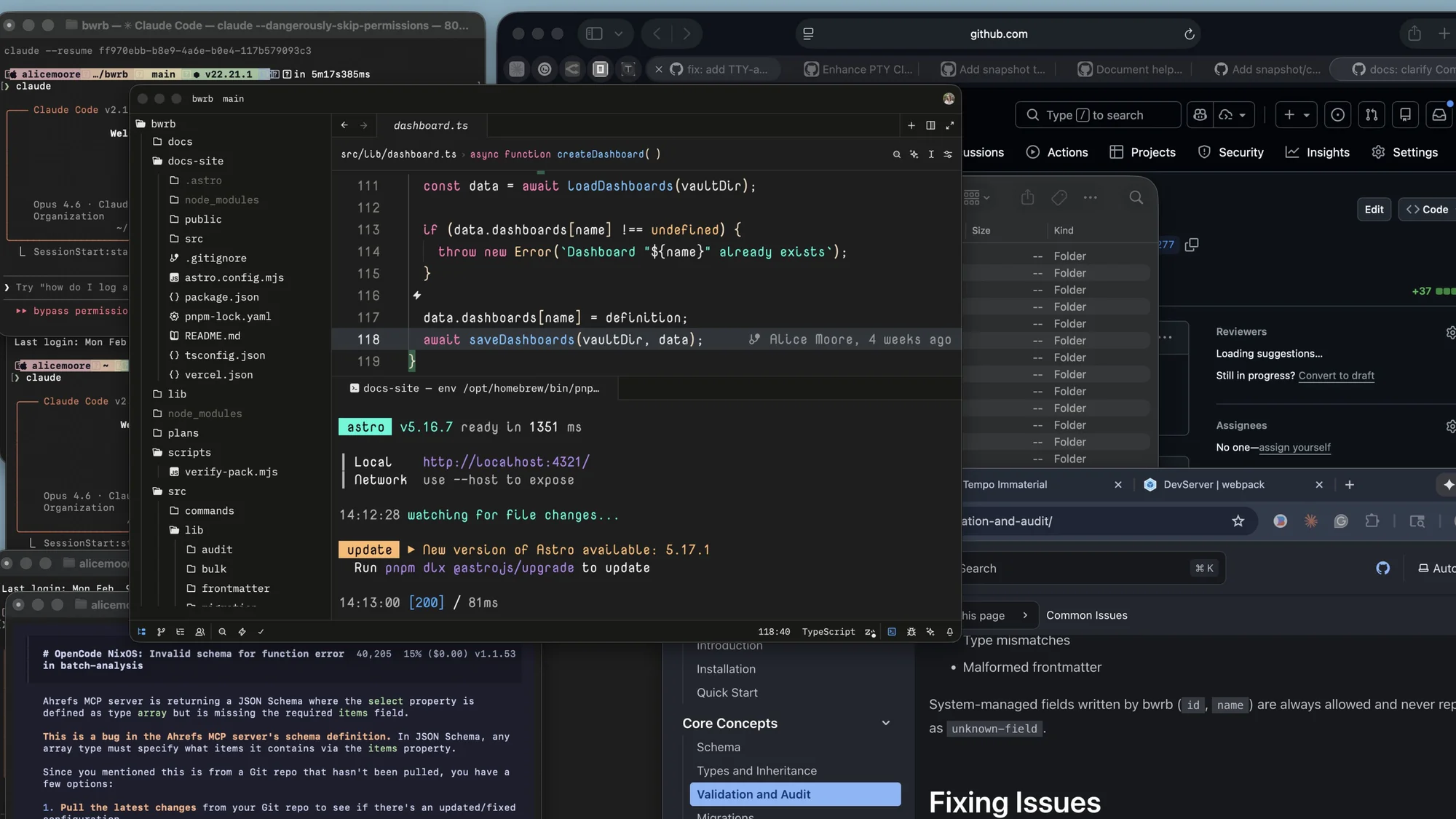
MCP Apps is the bet that UI belongs in the middle, so the host can pull the right artifact UI into the same workspace as the agent.
This only works if hosts ship real UX primitives like pinning, history, and sane layouts. Apps gives them a shared contract to build against.
Why you should care (even if MCP burned you)
If MCP has a reputation problem right now, it's because many people met it in its worst form: huge always-on tool catalogs, flaky servers, and awkward client UX.
It's worth saying out loud: most of that pain comes from host and server implementation choices, not the protocol itself.
Hosts decide injection strategy, toggles, consent, and artifact UX.
For instance, MCP context bloat is often a host behavior. For example, Claude Code now has tool search, which allows lazy-loading MCP servers, so tool schemas are only pulled when needed.
But it's not all the hosts' fault. Servers decide naming, schemas, and scoping. I've used plenty of MCP servers that didn't properly teach the agent how to use them, resulting in failed tool call spam.
We're still in MCP infancy, and we're still learning how to build around our tools. That said, MCP Apps matter because they turn artifact UX into a first-class host capability instead of an ad-hoc hack.
They have a real shot at bringing folks back to MCP to build more sustainable patterns around it.
How MCP Apps work
If you want a quick refresher on the MCP basics first, the
Model Context Protocol guide is a good primer.
MCP Apps take advantage of resources, which has been an oft-overlooked part of the protocol. Resources are files that ship with a server that tools can use to store and retrieve data. They’re useful for a bunch of things, but for MCP Apps, they’re specifically useful for storing HTML, CSS, and JS.
The mental model for MCP apps is pretty straightforward. A tool declares a ui:// resource, the host renders it as a sandboxed View, and the host bridges between that UI and the MCP server.
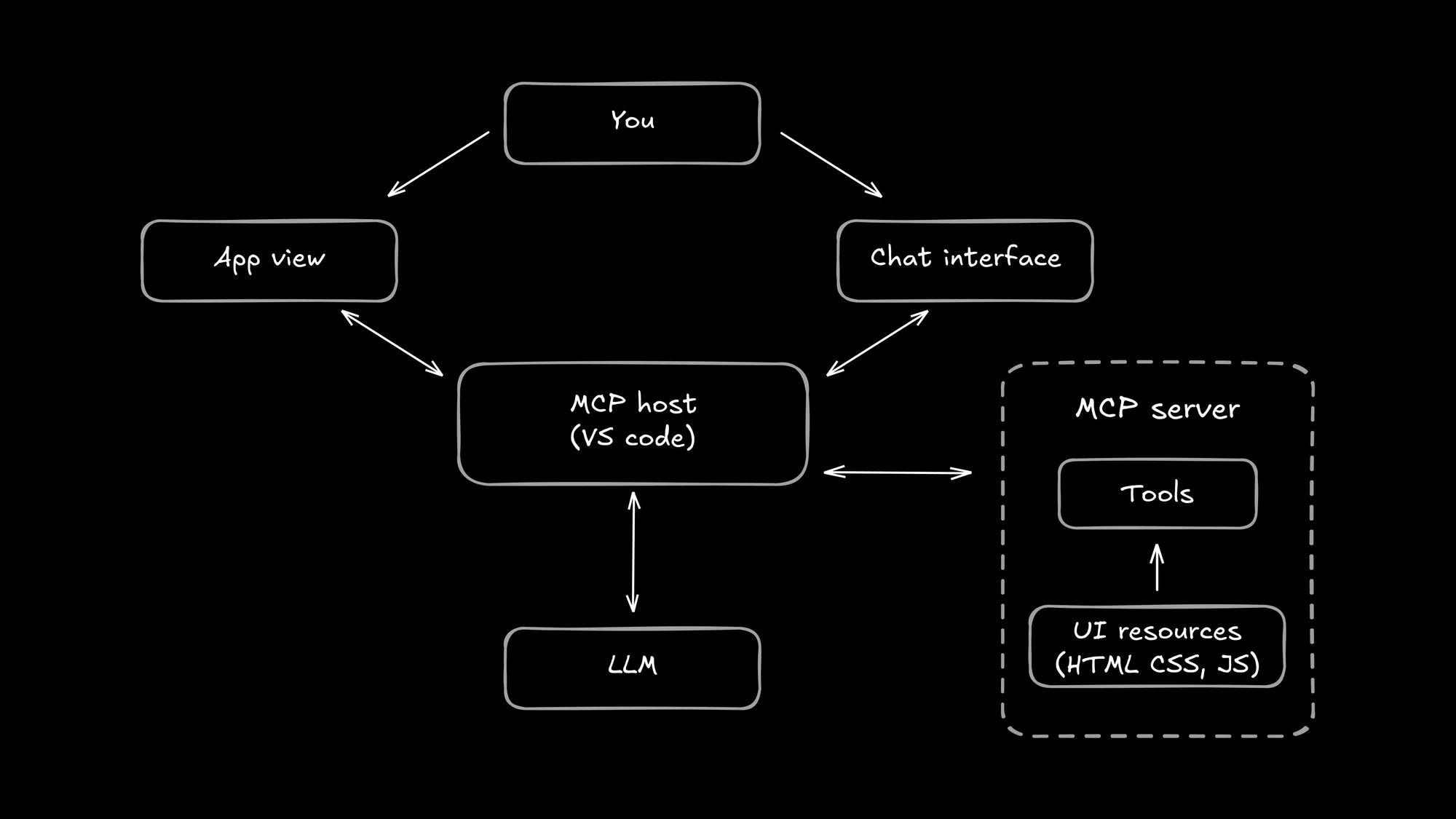
The MCP host (any tool that implements an MCP client, like VS Code) reads the UI resource, renders it, and opens a structured conversation with the View.
Under the hood, the View and host use a JSON-RPC bridge over postMessage, and the host mediates calls back to the server.
Two details make this work:
- UI is a progressive enhancement. MCP servers still work in text-only mode in hosts that don't support Apps.
- Tool results can carry rich data for the UI via
structuredContentwithout dumping it into model-facingcontent. The model never has to deal with all that HTML/CSS/JS in its context.
Where MCP Apps can shine
Even though the MCP App ecosystem is brand new, and not much has been released, I can already imagine some scenarios it could really help.
Diff review and approval
You know the pattern: the agent changes code, then either pastes a giant patch into chat or gives you a summary and asks for trust.
An MCP App can render a real diff UI (file tree, search, hunk selection), then emit a structured event like "comment submitted." Then the agent applies.
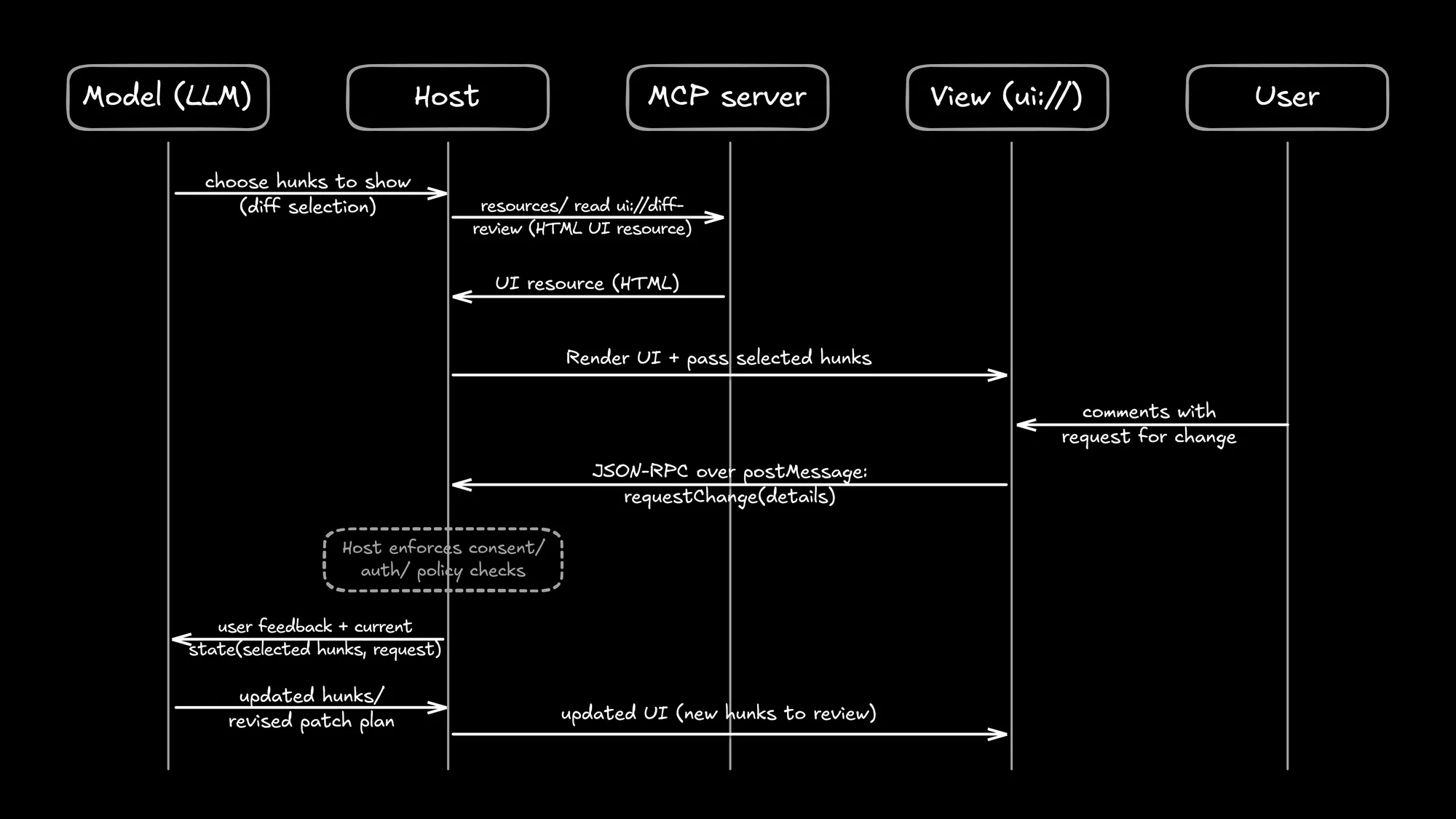
This allows for curation and consistency.
- Curation: Instead of showing the entire diff, the host can open the exact lines of code you're talking about with the agent, and you approve only what you want.
- Consistency: You could use the same diff viewer everywhere, without leaving your agentic flow. No window toggling.
Logs and live metrics exploration
An MCP App could render a timeline, filters, and a live stream. You pick the slice that matters (one request, one spike window, one error class), the app emits that selection, and the agent runs targeted tool calls.
The agent does what it's good at (correlate, search, propose). You do what you're good at (triage and judgment).
This is how you avoid the "paste 5,000 lines" loop. You narrow first, then commit the slice.
Configuration wizards
Any time you need to pick a bunch of options, chat could turn into a nice form with multiple choice, checkmarks, text fields, or anything else you need.
The UI can then emit one clean final object (and enforce constraints) instead of twenty back-and-forth turns with the model.
Good wizards also curate what you need to decide: prefill obvious defaults from your repo, then ask only for the actual policy choices.
Since the agent could create the form in whatever shape it needs, you save time and get to give more targeted input.
"Why MCP? I already have skills and the CLI."
This is the most common objection right now.
Skills, rules, and commands help a lot. They reduce prompt bloat and make agent behavior more repeatable. They're not going anywhere.
But skills are still just instructions in a markdown file. And your CLI tools, while they can do anything, are the wild west. (Plus, not everyone knows how to use them.)
MCP offers constraints: typed inputs and outputs, tool contracts, permissions, and host mediation. You get structured, repeatable interactions with agents. And creators of servers can do the heavy lifting so that users don't have to.
Apps then extend MCP's integration boundary to UI, so rich artifacts don't have to become chat text.
Do MCP Apps bloat context?
If your MCP skepticism is context-related, the obvious question is: does adding UI make the context problem worse?
MCP Apps don't automatically fix tool-definition bloat. If a host forces every tool schema into model context, you still pay for that.
What Apps can change is where rich data lives. The spec supports splitting output into model-facing content and UI-facing structuredContent, so the UI can render rich data without forcing it into model context as text.

The caveat is event spam.
If the app emits every keystroke, every slider drag, and every intermediate state change, you've reinvented context bloat as an event stream.
As a user, you can spot the difference pretty quickly. Good apps:
- Make the commit moment explicit (submit/apply/approve)
- Send fewer, higher-signal updates (not every intermediate interaction)
- Show what changed (a delta) before asking you to confirm
What to watch out for when using MCP Apps
MCP Apps introduce a little bit of confusion when using them.
Gotcha #1: Host UX becomes part of your product
The app doesn't control its container.
Hosts decide inline vs persistent rendering, container size, display modes, and multi-app navigation.
If the host renders the View in a cramped panel, the app might look bad. If the host hides it behind scrollback, it feels like the app disappeared.
The same MCP App can feel great in one host and broken in another. Sometimes that's the host. Creators can mitigate this by ensuring the app works across viewport sizes, just like a website.
Gotcha #2: The model can't see the iframe
It's easy to assume the agent can see whatever you see in the View. It can't.
The agent only sees what the app emits (events, context updates, tool results). If you type into a form field and never click Submit, there may be nothing for the agent to react to.
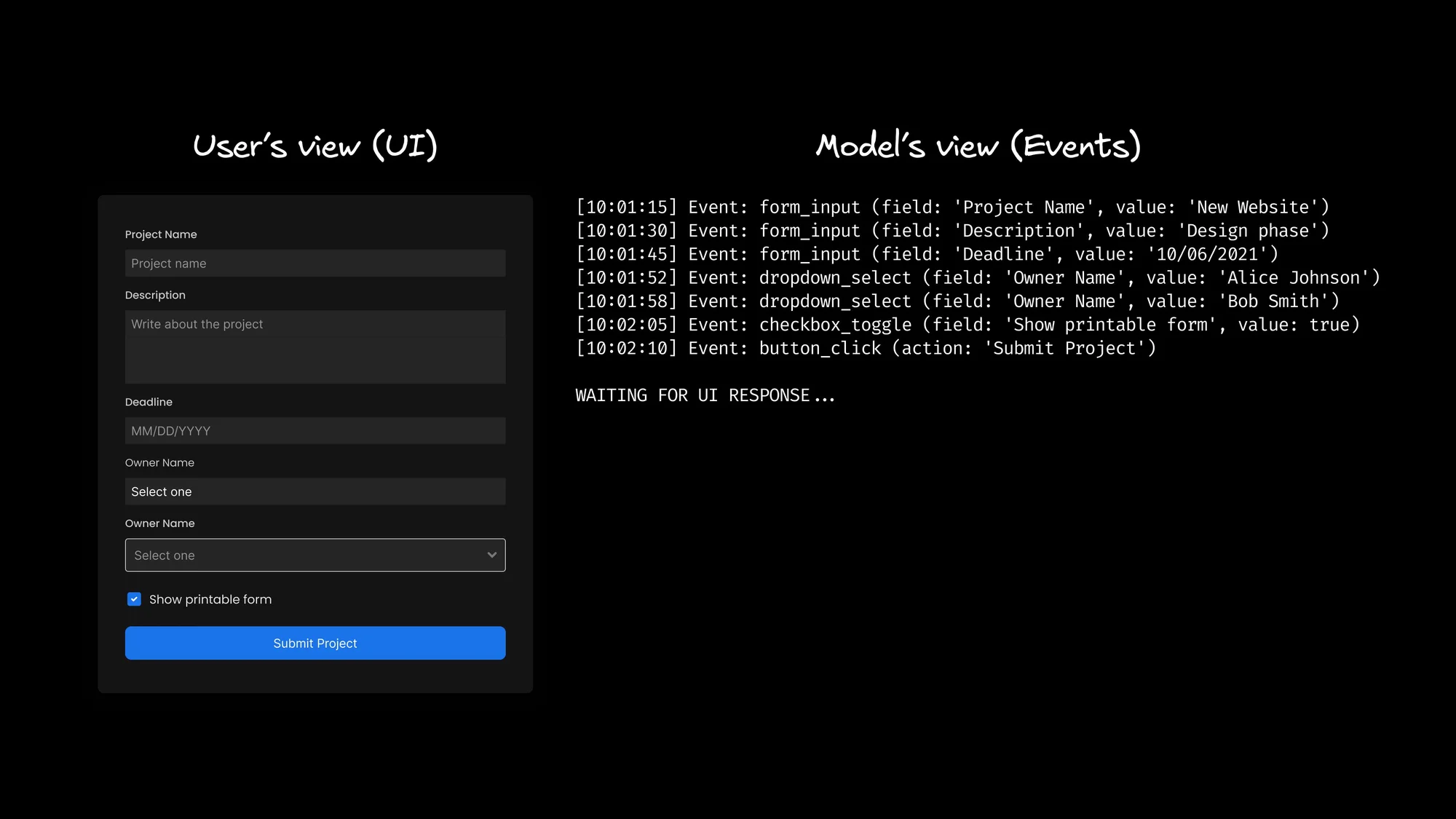
If the UI doesn't have an explicit submit/apply/approve action (or a clear "synced" affordance), expect "why didn't it notice" moments.
Gotcha #3: Round-trip latency
UI-triggered tool calls are still tool calls.
If the View triggers a tool call on every click, the UI will feel laggy even when nothing big is happening.
Some interactions will be slower than a local UI because they're really tool calls. Good apps should make this obvious with loading animations.
When MCP Apps won't help much
If your workflow is already terminal-shaped (run a command, read a small output, iterate quickly), MCP Apps probably won't add much.
Don't shoehorn a UI into places where text is already the superior interface:
- Search and refactors (grep-ish scans, quick edits)
- One-shot commands (run tests, format, lint, build)
- Small, structured edits (YAML/JSON changes where you want the raw file)
MCP Apps is for the stuff that's not terminal-shaped: diffs, dashboards, traces, tables, previews, approvals. You want a real canvas for artifacts, not another text wall.
And personally, I'm excited for MCP Apps to bring us back out of our strange TUIs into dedicated GUIs.
The MCP Apps security model
The security model is one big reason having an official extension matters. At a high level, MCP Apps tries to make UI embedding safer and easier to audit:
- Views run in sandboxed iframes.
- The message channel is explicit (
postMessage). - Servers declare content security policy (CSP) metadata. Hosts enforce it.
- UIs can request permissions. Hosts choose what to grant.
But there's a lot this doesn't promise. Apps don't magically make an unsafe MCP server safe. You still have to use good judgment.
If a host lets a UI call sensitive tools without consent, a UI can still do damage. The host is the choke point.
Why now (and why standardization matters)
UI-over-MCP patterns existed before MCP Apps were official. The interesting part about Apps is less "UI exists" and more "there's a shared target now," so hosts can implement once and servers can build to a standard.
We're already seeing MCP Apps support in Claude, ChatGPT, Visual Code, Goose, and a few other smaller providers. Everyone else will follow soon.
And if all your favorite agentic tools support MCP Apps, you can quickly imagine a world where you aren't using a browser or terminal nearly as much, since the agent can pull up any context you need right in chat.
We just need people to keep making more and better MCP servers.
A note on personal MCP Apps
One reason MCP Apps are exciting to me long-term is personal software.
Now that AI coding tools are as good as they are, I automate many of my day-to-day hiccups with simple software. I've made my own todo app, personal knowledge management system, and even some home automations.
If MCP Apps lands well across hosts, you might want your next tiny tool to be an MCP App, callable inside the same workspace where you're already asking your agent for help.
You can imagine how useful it would be to bring up your own personal todos at any time in the chat. Or build a quick utility to explore open PRs at a glance, with the high-signal info you personally need to be successful.
Just put the artifact you need where you already are all day. No more window hunting.
If you do want to build your own MCP server, here’s how to get started.
Build workspaces instead of tools
MCP Apps is a chance for AI coding hosts to stop pretending everything is a tool call and start acting like a workspace: chat for intent, plus a real canvas for the artifacts you need to inspect, edit, and approve.
Hosts still have to build the UX, and servers still have to ship focused toolsets. Apps gives the ecosystem a shared contract to build against.
At Builder, we're already on our way to adoption. It goes with our core philosophy of keeping the work visually in front of you while you orchestrate as many agents as you need.
If you're interested in how that looks in practice, check out some use cases or import one of your existing repos into Builder today.