How to Make AI Match Your Design System
Why AI-generated code doesn't match your component library, and how to fix it.
An engineer opens the code and finds generic Tailwind classes, Shadcn defaults, and no trace of the component library the organization spent years building. The engineer rewrites it, absorbing most of the time the AI was supposed to save.
The instinct is to attribute this to AI capability. The actual explanation is simpler: the agent had no idea the design system existed. That distinction matters because it changes what you do about it. A capability gap requires waiting for models to improve. A context gap requires giving the agent the context it needs. Most teams are solving the wrong one.
Watch a session where we index a real component library and open a PR within a standard engineering workflow.
Treating your design system as the foundation AI builds on takes specific work to pay off. The eight parts below each tackle one piece of the problem, from how agents read your codebase to how the review workflow changes once the context is in place.
01Design systems as AI infrastructure
The framing most organizations use for their design system is product: something the design systems team builds and ships, with an adoption metric attached. That framing made sense when the primary consumers were human engineers who could read documentation, ask questions, and make judgment calls about which component to reach for.
AI agents can't do any of that. They work from whatever context they're given at the time of the request. Without an explicit, structured reference to your design system, the agent falls back on its training data, which skews heavily toward the most common patterns it encountered: open-source component libraries, generic token structures, and default implementations that look production-ready but don't fit any specific organization's conventions.
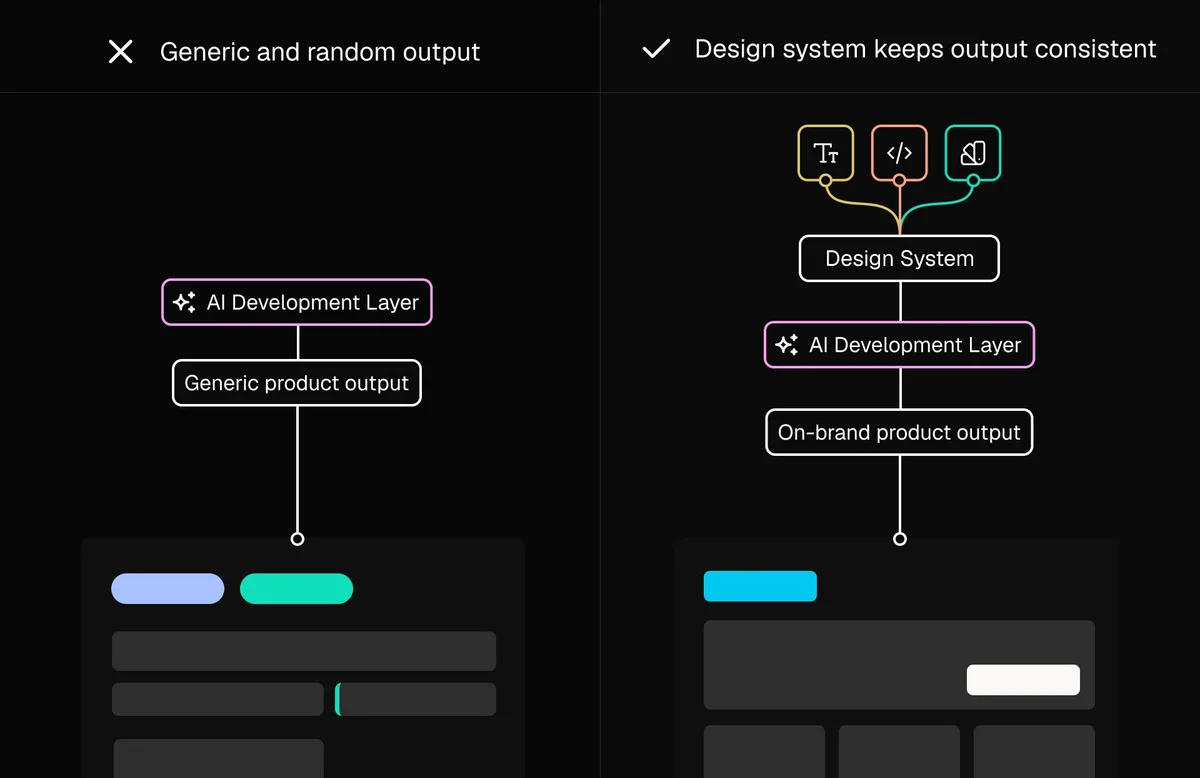
The teams getting the most out of AI-assisted development have made a different bet. They treat the design system as infrastructure, the layer every AI tool runs on top of, and invest in it before adopting new tooling. Every AI development tool they adopt produces better output from day one, because the foundation those tools depend on is solid. The teams still fighting with AI-generated output that doesn't match their system have usually adopted the tooling first, deferring the infrastructure question, and the cost shows up as engineering time spent correcting output that should have been right.
The gap between reading and understanding
Coding agents can read files. Most AI development tools give agents access to your repository, and they'll scan whatever they need to answer a prompt. Reading and understanding are different things, though, and the difference shows up in the output.
Understanding means the agent knows which components exist for which use cases, when to use each variant, what tokens control what behavior, and what the accumulated conventions look like across hundreds of decisions made over years of development. A just-in-time scan of your component files produces a surface reading. It captures what's there but not the reasoning behind it, the relationships between components, or the patterns your team has deliberately established.
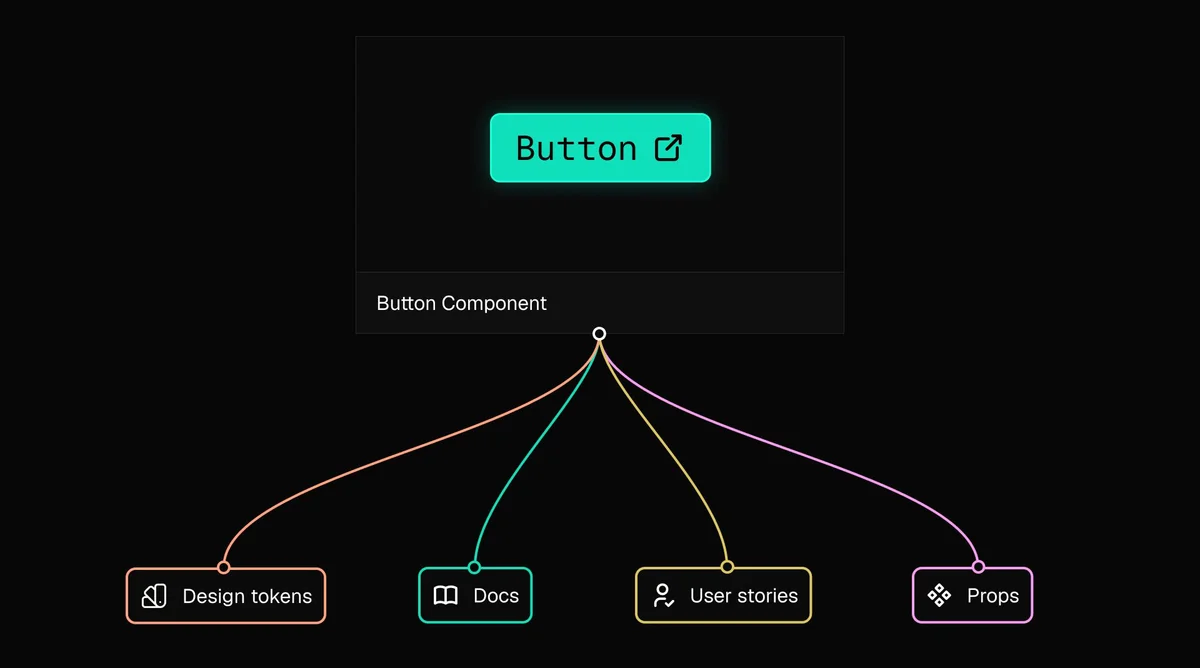
Purpose-built indexing generates structured, LLM-friendly documentation derived from your codebase. With that in place, the agent stops reconstructing your design system from scratch on every request and starts building from what your team has actually established.
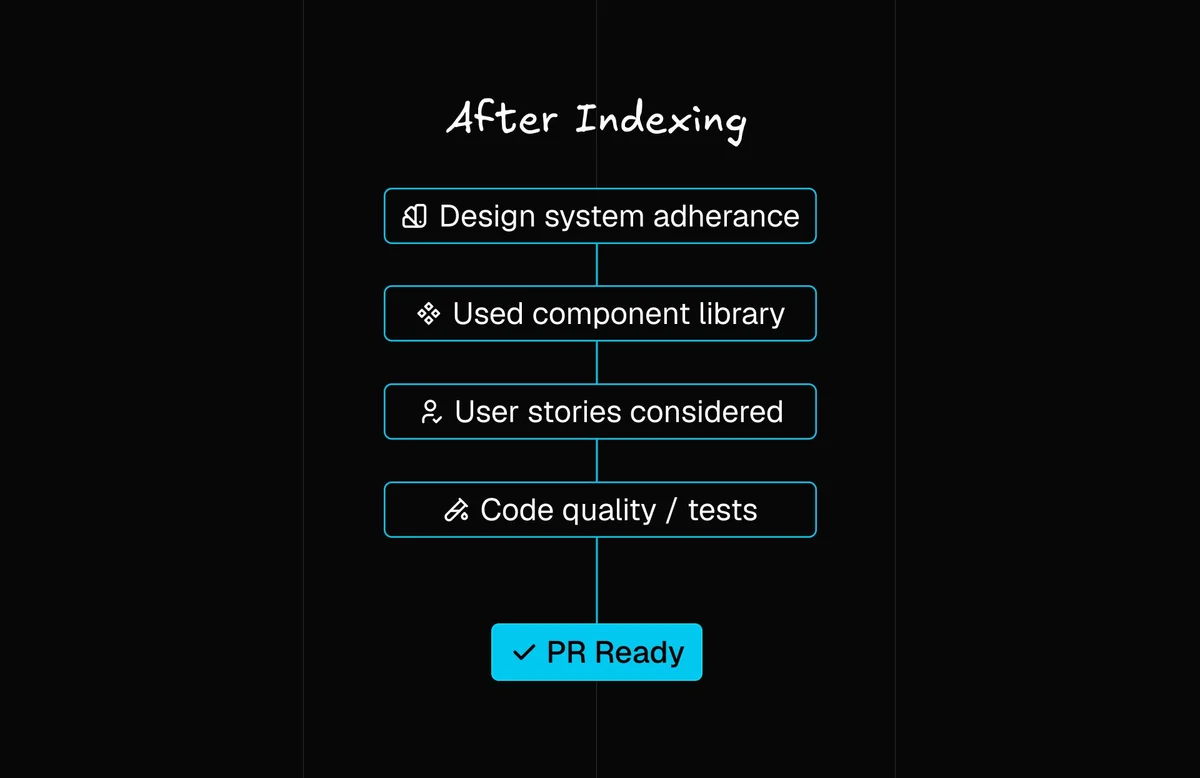
What gets indexed
Setup is a one-time task. Once the index is created and attached to a project, it updates automatically as your design system evolves. New components, updated tokens, and revised documentation get pulled into the index in the background, keeping the agent current without ongoing maintenance from your team.
The adoption problem is an infrastructure problem
Design systems don't fail because of poor technical execution. They fail because adoption drops off, and teams route around the system rather than through it. Engineers hard-code values instead of using tokens, product teams build one-off components rather than contributing to the shared library, and the gap between what exists and what teams actually use widens over time.
Adoption drops because using the design system correctly requires more coordination than going around it. Given those options, teams make a rational choice that compounds into a maintenance problem: the system falls further behind, the gap widens, and teams route around it more. This is the same backlog dynamic AI didn't solve on its own — the cost of a small item is almost the same as a full enhancement, so the small items never get done.
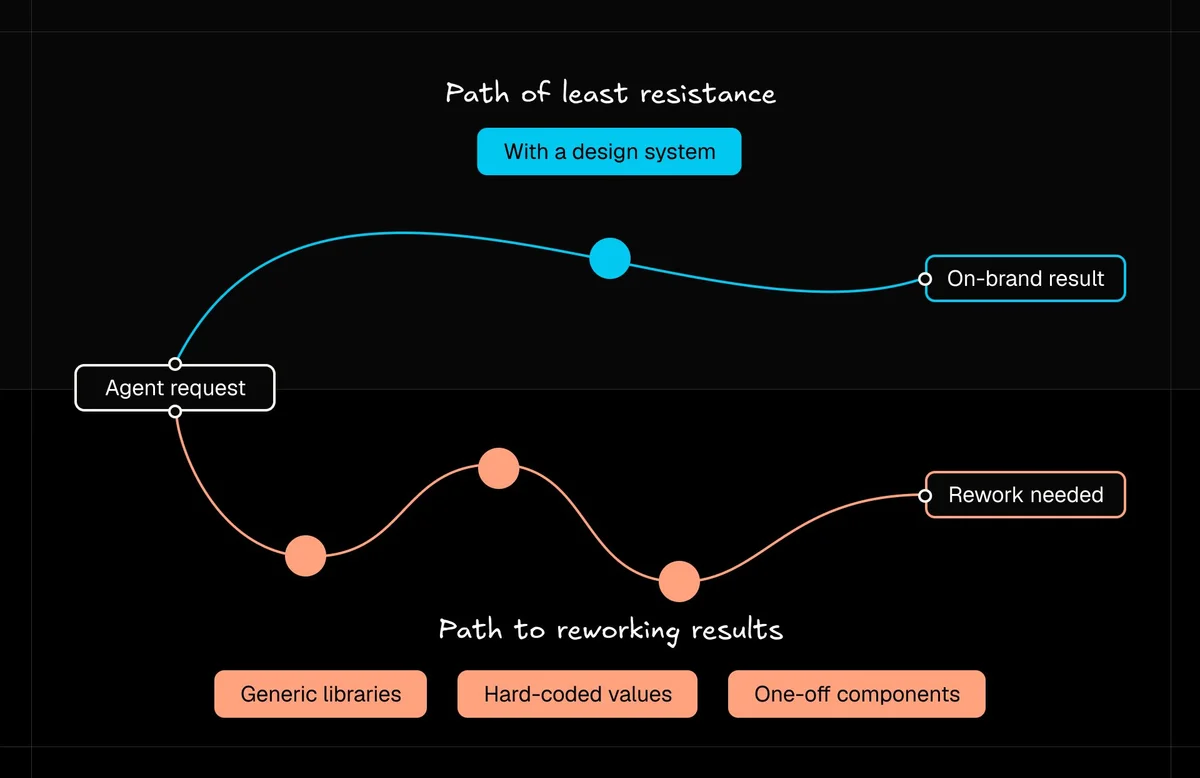
The AI layer changes this calculation, but only if the design system is indexed. When an agent can create a new component from a Figma export, generate Storybook documentation, and open a PR in a fraction of the time the manual process takes, using the design system correctly becomes the path of least resistance. The system grows faster, stays current, and gets used.
Documentation quality determines output quality
One thing teams discover after setting up indexing is that the quality of the agent's output directly reflects the quality of their existing documentation. Any AI system working from your codebase will produce better output if the codebase is legible, and indexing makes the gap visible in a way that's actionable.
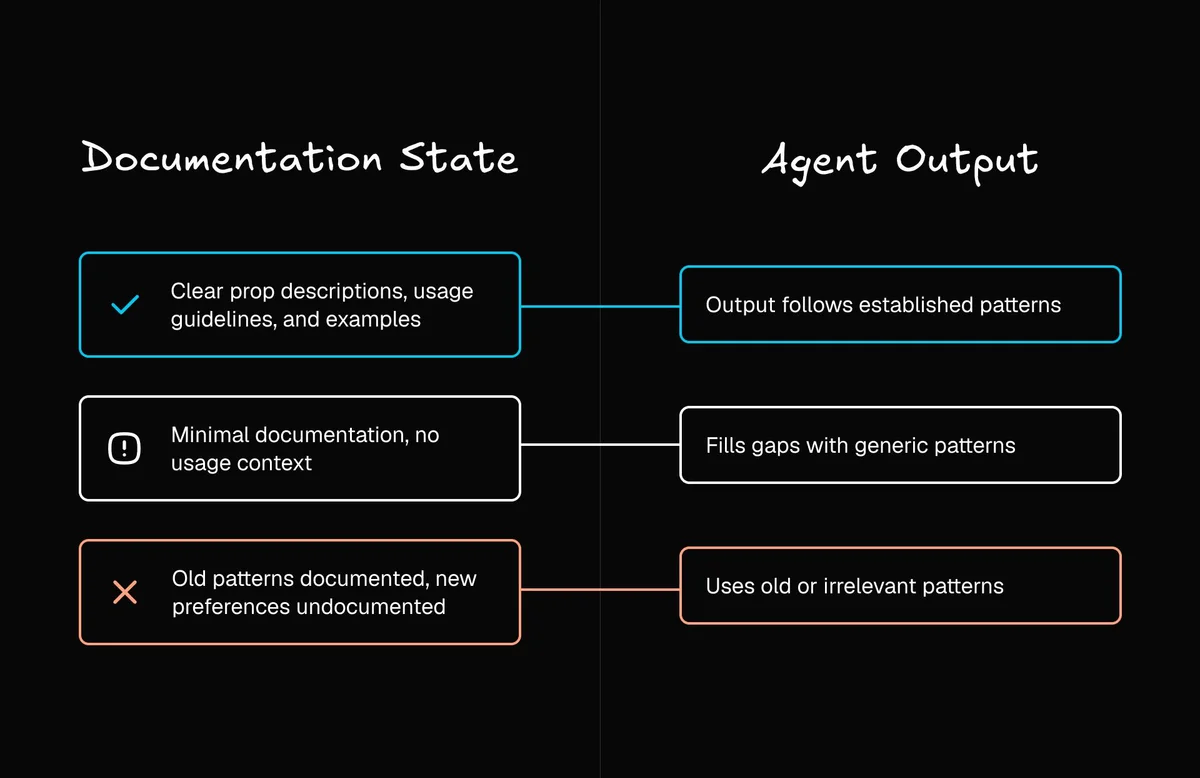
When an agent generates a component using a pattern your team has explicitly moved away from, the most likely explanation is that the old pattern is documented and the new preference isn't. The fix is documentation. Teams that have done this work report a compounding effect: documenting the reasoning behind design decisions improves agent output, reduces the rework required during review, and frees up engineering time to further improve the documentation.
Figma-to-code alignment as a prerequisite
A design system in which the Figma library has drifted from the coded components creates a specific failure mode: the agent receives a Figma export and generates code against a library that looks right, but doesn't match production. The designer approves the output because it matches their Figma file. The engineer flags the mismatch in review. The work goes back for correction.
Teams often experience this as an AI accuracy problem when it's a source-of-truth problem. The agent produced exactly what its context told it to produce. The context was wrong.
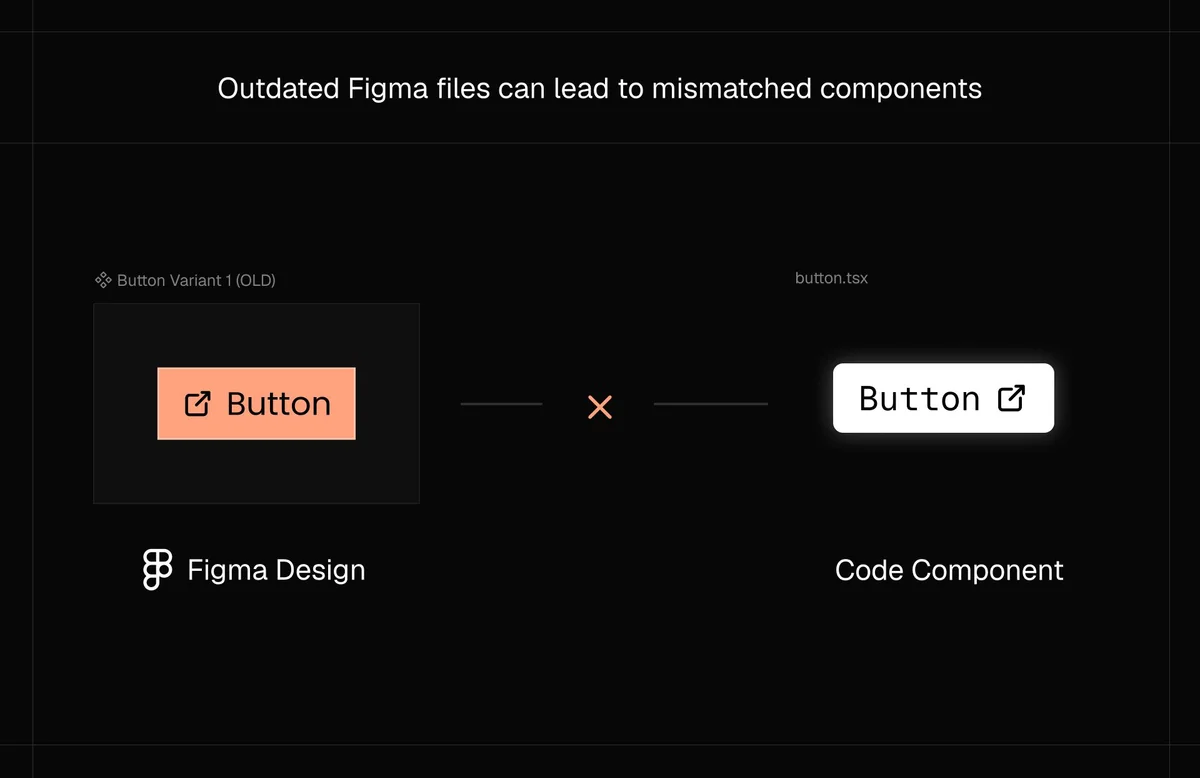
The resolution: get the Figma library and the component library back in sync, document the mapping explicitly, and use component maps to maintain that alignment going forward. A Figma primary button maps to your codebase's Button component with the variant="primary" attribute. When that mapping exists, the agent applies it consistently. The investment in creating the maps is small relative to the cumulative cost of catching mismatches at review over time.
What this looks like in practice: migration
Moving a codebase from one version of a component library to another normally requires an engineer with deep familiarity with the design system, careful auditing of every affected component, and significant time on incremental changes to avoid regressions. With two indexes in place, one for the legacy version and one for the target version, the agent has enough context to approach the migration with real precision.
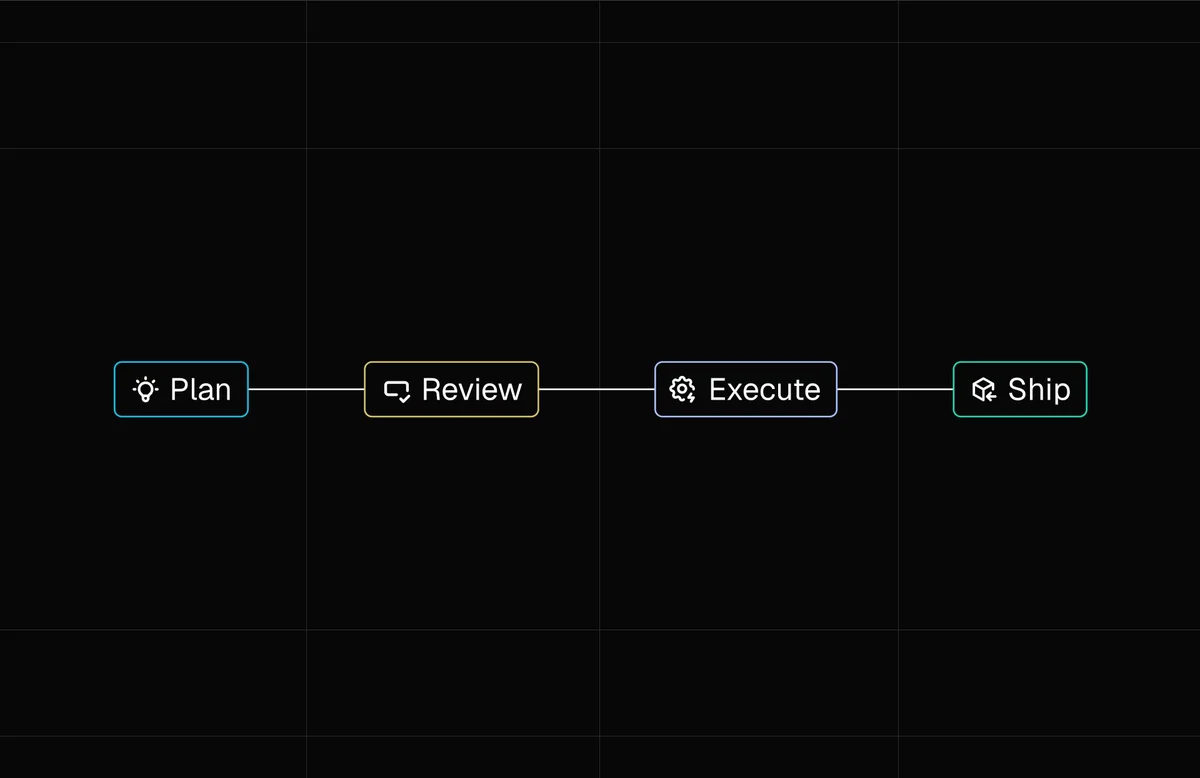
The agent investigates the codebase and proposes an approach before executing anything. The design systems lead reviews the plan, asks clarifying questions, and approves it before changes touch the codebase.
The agent builds a migration checklist before writing a single line of code: what's being deprecated, what the replacement components look like, and how they differ.
The agent applies the correct package versions, updates component references, and preserves design system constraints throughout.
When it finishes, it flags remaining issues. The designer shares a preview link with engineering for sign-off, and the PR goes out through the standard workflow.
An agent that runs ahead of its plan can produce output that looks correct and isn't, and catching that in review is more expensive than catching it before the work starts. Plan mode is a small investment that eliminates a large category of rework. The same indexed context that supports migration supports creating new components from Figma exports: a designer exports a component, attaches it to a prompt, and the agent generates the component, produces Storybook documentation alongside the code, and opens a pull request through the standard git workflow.
How the review workflow changes
When design system indexing is in place, and Builder requires sign-off from design and product before a PR reaches engineering, the review queue looks different. Engineers spend their time on judgment calls that actually require their expertise. When the queue is populated with PRs that have already cleared design review, throughput improves without increasing headcount.
Background agents make parallel work tractable in a way that's hard to achieve with the standard sprint model. While one agent executes a migration on a dedicated branch, additional work can be kicked off from Slack or Jira without breaking anyone's focus. Each agent operates on its own branch with its own isolated environment and a shareable preview URL.
From bottleneck to quality gate
The standard response to a design system backlog is to grow the design systems team. That works, but slowly, and it doesn't address the root cause: the process for creating, updating, and distributing components requires too much coordination per request. With indexed context in place, non-engineers can contribute to the coded design system using Figma exports, natural language, and the visual editor. Engineers review and approve via the standard PR flow.
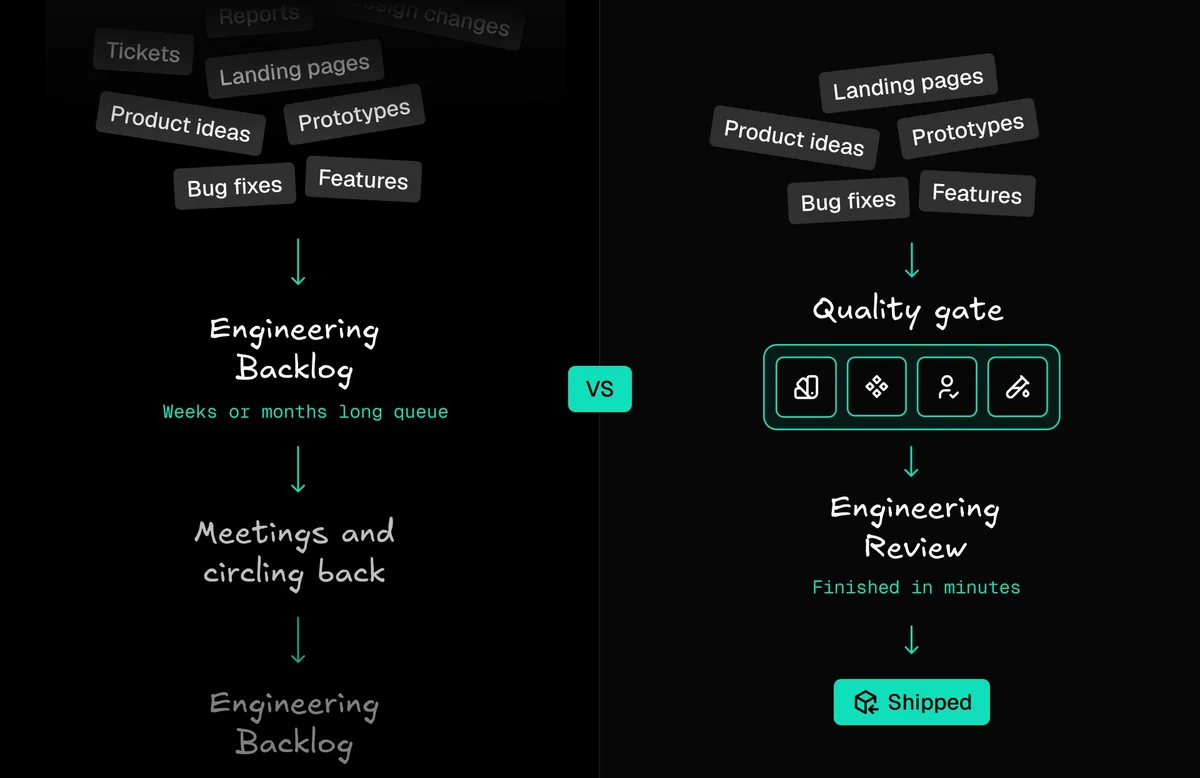
The organizational shift is from bottleneck to quality gate. A bottleneck creates a queue that grows over time. A quality gate processes work that arrives in better shape, reviews it faster, and ships it sooner. Design systems leads who have made this shift describe a fundamentally different job, one where setting standards, improving documentation, and evaluating new patterns get more time because the implementation work is no longer consuming most of it.
The Underlying Argument
Every AI tool your team adopts works from your design system as its foundation
The quality and completeness of that foundation determine the ceiling on what the AI can produce, and faster code generation doesn't improve delivery timelines if the output doesn't fit the system it's meant to merge into.
The investment required isn't new tooling. It's the design system work most teams already know they should be doing: component coverage, documentation quality, Figma-to-code alignment. What changes is the return on that investment. A well-maintained design system now also determines how well every AI tool your team adopts performs from day one.
None of this requires reorganizing your team.
Builder indexes your real codebase, design system, and documentation, then generates code using your actual components, tokens, and patterns. Designers export from Figma, PMs kick off work from Slack or Jira, and the output arrives as a pull request that has already cleared design and product review. Engineers approve through the same git workflow they use today.