How to reverse engineer a website with AI
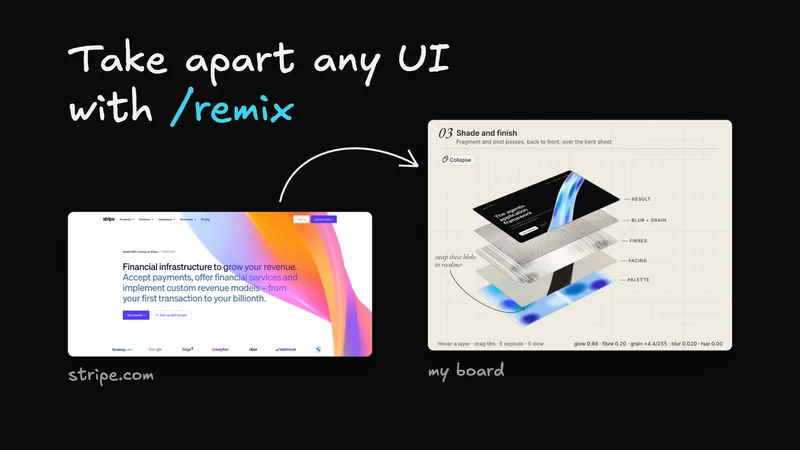
I kept going back to the wave at the top of Stripe's homepage, and I wanted to know how it was made. When I reverse engineer a website like that, Chrome's DevTools gets me part of the way. /remix, an open-source skill for Claude Code and other coding agents, does the rest. It pulls the wave apart into layers I can tweak in Agent-Native Design, then rebuilds it in my own project with new code.
The same steps work for any piece of UI you like on another site, such as a menu, a pricing table or a hover state. You don't need to know WebGL or shaders to follow along.
The wave on Stripe's homepage, then my remix of it in Agent-Native Design, with the knobs that change it.
What you need
- A site with UI you want to learn from
- Google Chrome
- Claude Code, Codex, Cursor or another coding agent
- The /remix skill
- Your own project, for step 6
To install /remix, open a terminal in your project's folder and run:
The install also connects /remix to Agent-Native Design, a free and open-source design tool that runs in your browser. /remix opens it for you when it builds your board in step 4, and you don't need an account.
How to reverse engineer a website's UI
1. Choose what you want to learn
Pick one thing on the page and write down what you want to know about it. For the Stripe wave, I wanted to know how it moves and why its colors blend so smoothly.
If you're new to this, start with something that moves on its own or reacts when you hover. Those are the hardest to work out by looking. A whole page is too much to take apart at once, and your questions tell you what to write down in step 5.
2. Find the element that draws it
Right-clicking something and choosing Inspect usually takes you straight to its HTML. Animations like Stripe's wave are different. They're drawn on a , a blank drawing area where code paints pixels. It often sits behind the text with pointer-events: none, so your clicks pass straight through it to whatever is in front.
To find it, open Chrome's Console with Cmd+Option+J on a Mac or Ctrl+Shift+J on Windows. Paste this and press Enter to list every canvas on the page:
On stripe.com in November 2026, the first result is single-wave__canvas, the large canvas at the top of the page, with pointerEvents: "none". That's the wave. Its size changes with your window.

If the list comes back empty, the piece you picked isn't on a canvas. Use Inspect to find its element instead.
3. Check whether it's CSS or WebGL
Moving UI is usually built one of two ways. CSS animations live in the page's styles, and Chrome can play them back slowly for you. WebGL draws graphics with your computer's graphics chip, using small programs called shaders that color every pixel, every frame.
Once the effect is moving, run this in the Console with your canvas's class name:
On stripe.com, webgl2 comes back true, so the wave is WebGL. That's why Chrome's Animations panel shows nothing for it. Its shader code is also minified, squeezed onto a few lines with short names, so reading it by hand is slow going even for developers.
If yours turns out to be CSS, open Chrome's Animations panel to slow it down and read its timing and easing. A cssAnimations count above zero only means CSS animations run somewhere on the page, so check that yours is one of them.
4. Take it apart with /remix explain
In your coding agent, run:
The agent opens stripe.com in its own browser, watches the effect run, and reads its HTML, CSS, JavaScript and shaders. Then it opens a board in Agent-Native Design.
The board shows the original next to a row of live demos, one for each layer of the effect, such as its shape, motion, shading and colors. Each demo has its own knobs. Nothing in your own project changes in this step.
/remix is also on my list of the best Claude skills for designers.
My board for the Stripe wave. The original and my remix sit at the top, and the three layers it found sit in the row underneath.
5. Turn the knobs one at a time
Each knob controls one setting of the real effect, like speed, intensity, colors or scale. I drag one, watch what changes in that layer and in the full effect, then put it back before trying the next. When two knobs move at once, it's hard to tell which one did what.
The Folded sheet layer is the flat page the wave is drawn on. Displace and Twist bend it.
Twist and ripple is the motion. Each Twist knob turns the sheet around a different axis, and the edges move far more than the middle.
Shade and finish is the look. Glow, Fibre and Hue shift change how the sheet is lit and colored without touching its shape.
The same knobs work on the finished remix, so you see each change in context.
As I go, I write down what each knob does in my own words, next to my questions from step 1. Those notes are what let me change the effect on purpose later.
6. Rebuild it in your project with your brand
When you want something like it in your own work, open your coding agent in your project's folder and say where it goes:
/remix writes its own description of how the effect behaves, then builds a new version from that description with your project's code and components. It uses your colors, fonts and icons, and your own copy.
None of Stripe's code, shaders, fonts, logos or images come along. Anything Stripe owns, like a custom texture, gets a stand-in that looks similar. Speed, intensity and colors become props or CSS variables in your code, so you can keep adjusting them after it's in.
7. Check your version against the original
A single frame can match while the motion is still off, so compare the two at the same moment of the animation. Before /remix applies your brand, it shows your rebuild next to a capture of the original, both in the original colors. The two match in screen size and in the point the animation has reached. Once they match, compare again in your colors.
/remix also runs checks on your version, including one for reduced motion, and reports pass or fail. I still check three things myself before I ship:
- The animation stops when reduced motion is turned on in your computer's accessibility settings
- The page still works on a device that can't run WebGL
- The page loads as fast as it did before
More examples
Here are three more sites taken apart with /remix. Each board shows the original next to the remix, then a row of layers that explains it.
Raycast's glass rods
Raycast's homepage looks through sixteen rods of glass at a moving wave of color. It's WebGL refraction, and the remix keeps the rods and swaps the colors.
GSAP's kinetic type
GSAP's headline animates letter by letter on one timeline, with a squiggle that follows your pointer. The breakdown puts each letter group on its own layer.
rauno.me's sheet track
Scrolling on rauno.me slides a row of sheets, zooms out and pans the words, all on springs. The breakdown shows the row of sheets behind the window that clips them.
Common problems
Chrome won't let you paste into the Console
Type allow pasting and press Enter, then paste again. Chrome asks once to protect you from running code you don't trust, so only paste code you've read.
Inspect selects the text in front of the animation
The animation sits behind that text and lets clicks pass through. Run the canvas list from step 2 and look for the canvas with pointerEvents: "none". On the /remix board you can also select the wrapper, and /remix finds the layer behind it.
Your rebuild matches a screenshot but the motion feels off
The timing doesn't match yet. Run the comparison from step 7 again at the same moment of the animation, then adjust speed and easing until the motion lines up.
You pasted the site's minified code or shaders
Pasted code brings someone else's code into your project, and it's hard to change later. Rebuild from your notes in step 5, or let /remix build from its own description of the effect, which writes new code.
Questions
Is there a skill to reverse engineer a website?
Yes. /remix is an open-source skill made for UI. /remix explain takes a piece of a website apart into live layers you can tweak. /remix rebuilds it in your project with new code. It works in Claude Code, Codex, Cursor and other coding agents, and installs with npx @agent-native/core@latest skills add remix.
Can AI reverse engineer a website?
Yes, for everything that runs in the browser. A coding agent can open the page in its own browser, watch it run and read the code the site sends, including minified JavaScript and shaders. It can't see the site's server code, because that never reaches the browser.
Do you need Agent-Native Design to use /remix?
It's where the board with live knobs opens, and that board is most of the learning. Agent-Native Design runs in your browser, and building a board doesn't need a sign-in. Without it, /remix explain falls back to a local page with the same knobs, and a rebuild finishes with screenshots.