5 Best Claude Skills for Designers in 2026
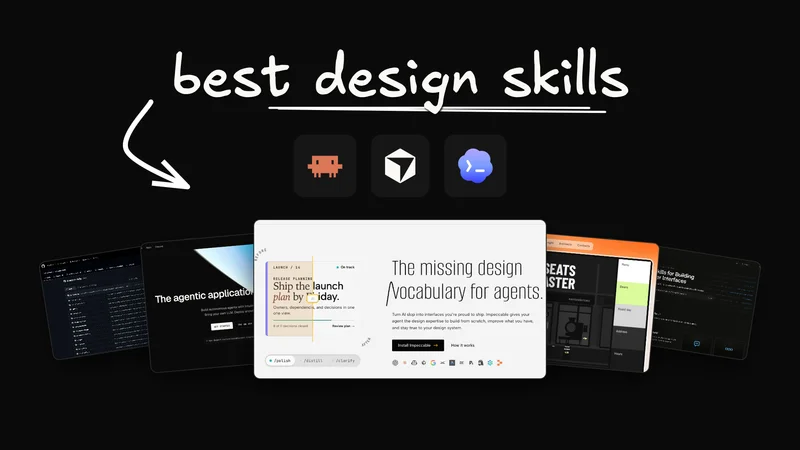
Most of my design work in Claude Code now goes through three skills. Impeccable is where I start any UI work. /remix is how I bring UI I like on other sites into my own designs, and Emil Kowalski's skills come out whenever something on the page moves.
taste-skill and the Designer Skills Collection round out the list, one for marketing sites and one for research and handoff work. You'll also see Anthropic's frontend-design skill on most lists like this one. It never did much for me, so it isn't here.
You can use these skills in Claude Code or whichever coding agent you prefer, like Codex, Cursor, Devin or T3 Code.
Which Claude skill to use for each design job
| Skill | Best for | Suits | Install | License |
|---|---|---|---|---|
Impeccable | Any UI work | Designers and design engineers | One npx command | Apache 2.0 |
/remix | Bringing UI from sites you admire into your designs | Designers and design engineers | One npx command | MIT |
Emil Kowalski's skills | Motion and interaction design | Design engineers | One npx command | MIT |
taste-skill | Building a marketing site from a brief | Design engineers | One npx command | MIT |
Designer Skills Collection | Research, critique and handoff docs | Designers who don't code | Claude Code plugin, then pick collections | MIT |
Best Claude skills for designers
1. Impeccable: where I start any UI work
Impeccable is the first thing I load whenever I start UI work, whether that's a new feature at work, a personal app I'm building, or a screen that already exists and needs help. If I could keep one skill, it would be this one.
It has 23 commands, and each one has its own playbook for one design job. You can type /impeccable followed by whatever you want, but I get much better results when I name the command and point it at one thing:
| Command | What I use it for | Example |
|---|---|---|
| Planning a new feature's UX before any code |
|
| Fixing grouping, spacing and reading order |
|
| Cleaning up type across the product |
|
| Making a screen work on mobile, tablet, print or email |
|
| The last pass before I ship |
|
| Finding what's wrong with a design that already exists |
|
What to like:
/impeccable initasks about your product and audience and writes a PRODUCT.md that every other command reads, so even a side project gets designed for the people who'll use it- You pick how new pages get built. Code-led goes straight to code. Comp-led draws a mockup image first and builds from it, which needs an agent that can make images, like Codex.
auditscores a design without changing anything and names the command that fixes each finding, so I work down the list and end onpolish- Its rule checker runs in the terminal or in CI with no model involved, and it catches tells like Inter on everything, gradient text and nested cards
Tradeoffs to expect:
- It burns through tokens
- Comp-led loses some detail between the image and the code, so expect a few rounds when you go image first
Works well for: designers and design engineers who want a proper design pass on every screen they build.
Docs are at impeccable.style.
2. /remix: bringing UI that inspires you into your own designs
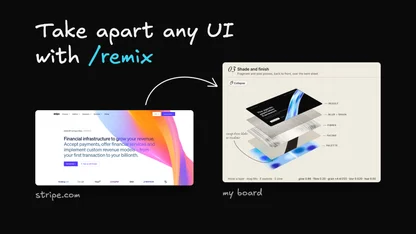
I keep a running list of sites with UI I like: a hero animation, a pricing table, a scroll effect. /remix takes one of those and rebuilds it inside my own design with my colors, fonts and icons. I learn how it works along the way, which is half the reason I use it.
Stripe's homepage ribbon, then my remix of it in Agent-Native Design, with its knobs for hue, twist and glow.
What to like:
- It studies the original in its own browser, writes its own description of how it behaves, and builds from that. None of the site's code, fonts or images come along.
- Every effect gets knobs for speed, intensity, colors and scale on a board in Agent-Native Design. I drag one at a time to see what it changes, then keep the values I like.
- Before it applies my brand, it lines the rebuild up against the original at the same moment of the animation, which catches motion that's slightly off
/remix explainlays out each layer of an effect on its own when I only want to understand it
Tradeoffs to expect:
- It takes a while. It has to work out how the original is built, recreate it, set up the knobs and explain it to you, so expect a few minutes per effect.
Works well for: designers who collect UI inspiration and want to make it their own while learning how it's built.
I wrote up the whole process on reverse engineering Stripe's homepage wave.
3. Emil Kowalski's skills: motion and interaction design
Anything that moves goes through Emil Kowalski's skills, and lately a lot that doesn't. His site lists 19, in the order you'd reach for them on a project. /emil-design-eng is the main one and holds his design engineering thinking. I reach for /animate to build one animation and /review-animations to check the motion in a change. /break-ui fills a screen with long names, odd emails and long lists to see what breaks, and /mobile-native fixes the small things that make a web app feel wrong on a phone.

What to like:
- The rules come with actual numbers. Keyboard-triggered actions don't animate, entrances and exits use ease-out, nothing scales up from zero, and most UI motion stays under 300 ms.
/animatewill sometimes tell you not to animate at all, and it's usually right/review-animationsends with a plain Block or Approve- The rules hold up outside the browser too. I use them when I make videos in code with Remotion or HyperFrames.
Tradeoffs to expect:
- Most of the 19 are about motion, so layout, color and type still need something like Impeccable
Works well for: design engineers polishing how an interface moves and responds, and anyone making video in code.
The full list is at aiforui.dev/skills.
4. taste-skill: building a marketing site from a brief
taste-skill builds a company or marketing site from a short brief. It writes the copy first, plans the page one screen at a time, and checks the result in a real browser before it hands it over.
Example sites from taste-skill's homepage. A coffee shop, a club night and an architecture studio each get a different style.
What to like:
- It checks the page at five screen widths and fixes what it finds, for up to three rounds
- The kind of business decides the style. A software or gaming site can get WebGL effects, while a cafe or hotel gets photos and type.
- It uses real photos from a licensed library, marked as stand-ins until you add your own
Tradeoffs to expect:
- It's great for marketing sites, but for product design Impeccable does a better job
Works well for: landing pages and company sites.
Then call it with /design-taste-frontend. It also installs as a Claude Code plugin with /plugin marketplace add Leonxlnx/taste-skill. Example sites and docs are at tasteskill.dev.
5. Designer Skills Collection: research, critique and handoff docs
This one is for the design work that isn't pixels, and it's the only skill here that doesn't need a codebase. Try /design-research:interview for interview scripts, /visual-critique:critique-screen for a ranked list of fixes from a screenshot or Figma link, and /design-ops:handoff to package a design for engineering.

What to like:
- It writes interview scripts and sorts research findings into themes
- It covers research, critique, design systems and handoff, plus a separate collection for inclusive design
/designer-toolkit:start-hereasks one question and points you to the right command, which helps with five collections to choose from
Tradeoffs to expect:
- It writes specs and plans, and it doesn't build screens
- Its screen design command makes its own color and spacing scales instead of using the tokens you already have
Works well for: designers who don't code and want Claude for research and process work.
Add the marketplace, then type /plugin, open the Discover tab and pick the collections you want:
Our picks
- Impeccable: you're starting any UI work.
- /remix: you saw something on another site and want it in your own design, or want to know how it's made.
- Emil Kowalski's skills: the layout is right but the motion feels off.
Questions
What are Claude skills?
A Claude skill is a folder of instructions, and sometimes scripts, that Claude loads when a task calls for it. Install one and Claude follows its playbook every time you call it. Design skills like Impeccable teach Claude how to lay out a screen, set type and check its own work.
How do you install a Claude skill?
Run the install from your project folder. Impeccable, /remix, Emil Kowalski's skills and taste-skill each take one npx command. The Designer Skills Collection installs as a Claude Code plugin: run /plugin marketplace add Owl-Listener/designer-skills, then pick collections in /plugin. Reload Claude Code afterwards, then call the skill by name, like /impeccable.
What's the best Claude skill for UI design?
Impeccable. It covers the whole job, from planning a new feature with shape to fixing layout and type on screens you already have, and it checks its own output. Add Emil Kowalski's skills when something needs to move, and /remix when you want to bring in UI from a site you admire.